Dell XPS 15 review: A bigger version of the best PC laptop [Updated]

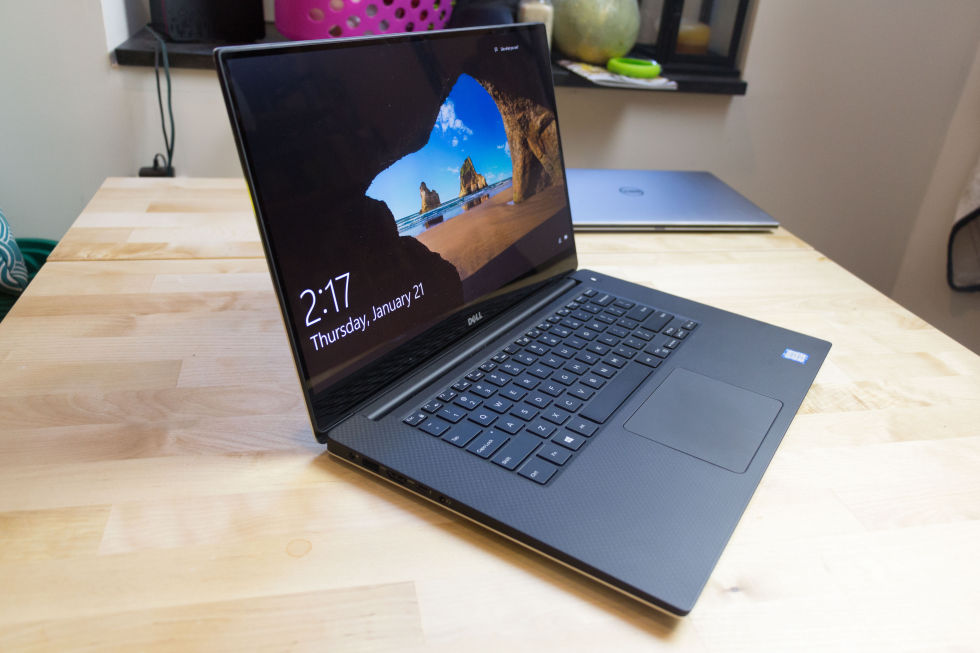
Dell has taken the best 13-inch laptop on the market and made it bigger.

The Dell XPS 15.

Laptop size is a personal preference. Having owned numerous 15- and 13-inch laptops and used various 11-inch ones, 13 inches is very much my sweet spot: a big-enough screen that I can have a bunch of open windows and a small-enough package that it's not too burdensome to carry around or use on the plane. Indeed, if you were to judge the market by what technology sites most commonly talk about and prefer (and by what most technology writers seem to use for their own personal machines) you'd probably think that 13-inch laptops, or perhaps smaller, were the standard mainstream option.

But they're not. Depending on which part of the world you're in, the typical screen size is 14 or 15 inches. Increasing the size of the screen lifts a lot of the constraints found in smaller devices. The Ultrabook class systems all use processors with a 15W thermal and power envelope, which limits them to a maximum of two cores and four threads. The power and cooling constraints similarly tend to preclude the use of discrete GPUs, forcing them to stick with the integrated parts built in to the processor. They also tend to offer only limited options for external connectivity due to an emphasis on being thin and light, and this same focus also tends to make them relatively expensive.

Since its release last year, Dell's XPS 13 system has won widespread plaudits, with many regarding it as the 13-inch PC laptop to beat. I recently reviewed the new Skylake version and found it to be a compelling mix of design and technology. And now, for the many people who want something bigger than a 13-inch screen, Dell has the XPS 15.

Read 21 remaining paragraphs | Comments
Oracle deprecates the Java browser plugin, prepares for its demise

It will be removed some time after the release of Java 9.

The much-maligned Java browser plugin, source of so many security flaws over the years, is to be killed off by Oracle. It will not be mourned.

Oracle, which acquired Java as part of its 2010 purchase of Sun Microsystems, has announced that the plugin will be deprecated in the next release of Java, version 9, which is currently available as an early access beta. A future release will remove it entirely.

Of course, Oracle's move is arguably a day late and a dollar short. Chrome started deprecating browser plugins last April, with Firefox announcing similar plans in October. Microsoft's new Edge browser also lacks any support for plugins. Taken together, it doesn't really matter much what Oracle does: even if the company continued developing and supporting its plugin, the browser vendors themselves were making it an irrelevance. Only Internet Explorer 11, itself a legacy browser that's receiving only security fixes, is set to offer any continued plugin support.

Read 1 remaining paragraphs | Comments

New Windows 10 preview build has a very different build number, but not much else

Work behind the scenes continues to dominate.

A new Windows 10 insider version has been released.

The new build doesn't bring much that you'll notice. For the past few months, Microsoft has been updating and refining the processes used to build and develop Windows 10 to better meet the needs of a continuously developed, continuously delivered operating system, and this has meant that user visible feature work has taken a back seat. But the new build does have one big change: its build number has leaped from 11107 to 14251.

This isn't because the company quickly rattled off 300-odd builds in the last couple of weeks but because of continued synchronization between Windows 10 on the PC and Windows 10 Mobile. The build numbers had already been synced between the two versions, but various internal components were different. These differences are being eliminated as the codebases are unified and brought together. As part of unifying the code, the build numbers have to be brought together, too. It happens that the Mobile fork was already using higher version numbers internally than the desktop one, so the desktop operating system has had to have its build number rolled forward.

Read 2 remaining paragraphs | Comments

Microsoft’s clever curved keyboard for iOS looks very smart

A good keyboard will get even better… if you have an iPhone.

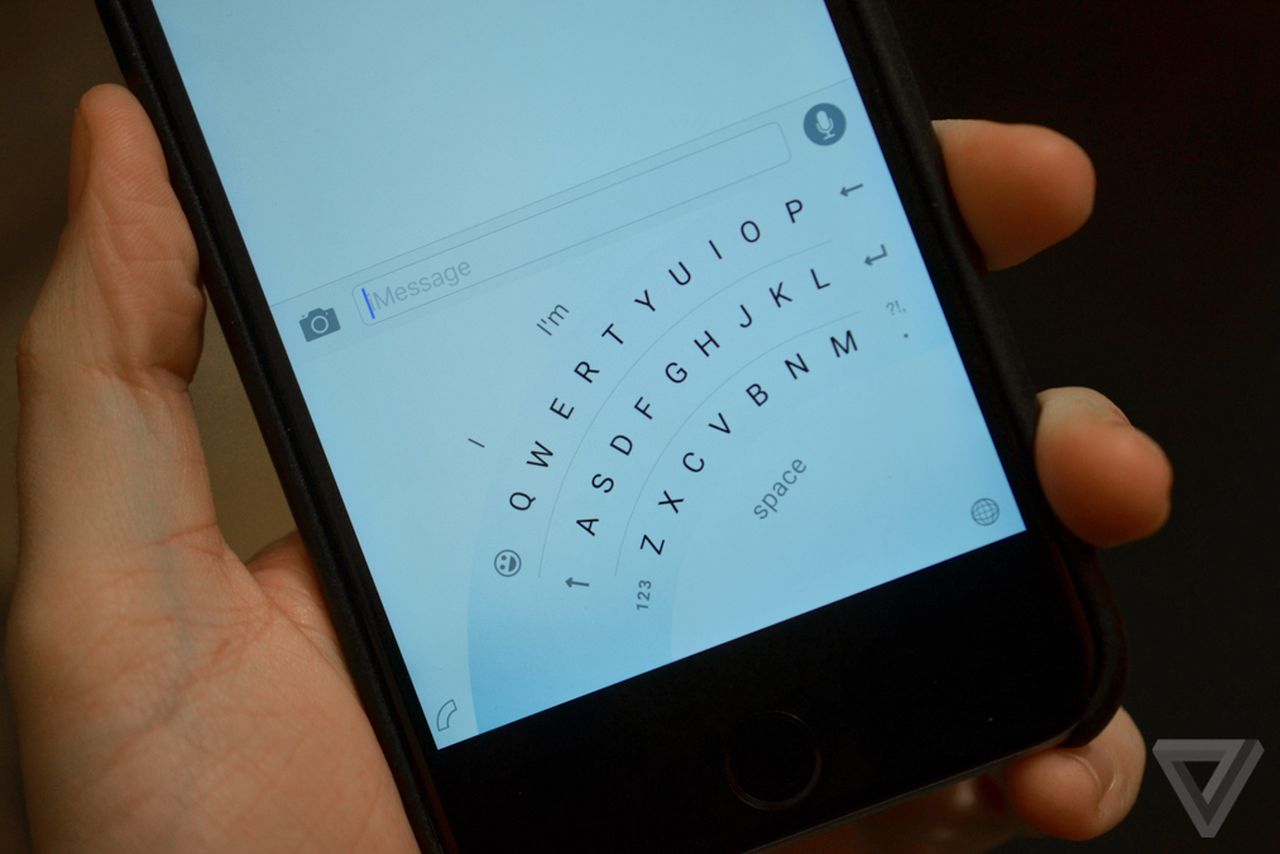
One of the enduring high points of Windows Phone and Windows 10 Mobile is the Word Flow software keyboard. It looks good and works well, with a generally sensible autocorrect algorithm and a good implementation of swipe-style typing. Earlier this month it was learned that Microsoft was planning to produce a version of this keyboard for iOS and Android, after e-mailed invitations were sent to some Windows Insiders.

Through The Verge we now have a good idea of what that keyboard will look like, and immediately we can see that it has a rather compelling feature not found in the Windows version of the keyboard: a curved one-handed mode that arcs the keyboard around either of the phone's lower corners. This neatly tackles a problem that a few of us here at Ars were pondering at lunch: how do you make a swipe keyboard work when the phone screen is so enormous that you cannot possibly reach both sides with your thumb. You'd have to hold the phone in one hand and then use your index finger, or something equally inconvenient.

The solution Microsoft has implemented in Windows 10 Mobile is to allow the keyboard to be scrunched down and pushed closer to one side of the screen or the other. The solution seen in the pictures of the iOS keyboard looks altogether neater: not only does it draw the very furthest keys in, so that they are within reach of the thumb, it also pushes the keys closest to the corner further out, away from the corner, so that you do not need to contort to reach those either.

Read 1 remaining paragraphs | Comments
Skype to hide IP addresses by default, protecting gamers everywhere

Comms software has been widely blamed for enabling denial-of-service attacks.

Microsoft has rolled out a new version of the desktop Skype client that should make users of its service a little safer from denial-of-service attacks. The Skype client has long leaked IP address information, allowing other users on the network to determine which IP address is being used by an account. A number of online services of various degrees of shadiness offer instant IP address lookups, and historically at least, these have worked effectively.

This leakage has been particularly widely abused in gaming communities. Many professional Dota 2 games last year were disrupted by denial-of-service attacks. Players were forcibly disconnected from the game, causing their team to play at a 4-versus-5 disadvantage. Skype, which is often used for coordinating games and in-team communication, was routinely fingered as the culprit since it leaks the IP address information of the players and thus enables these attacks.

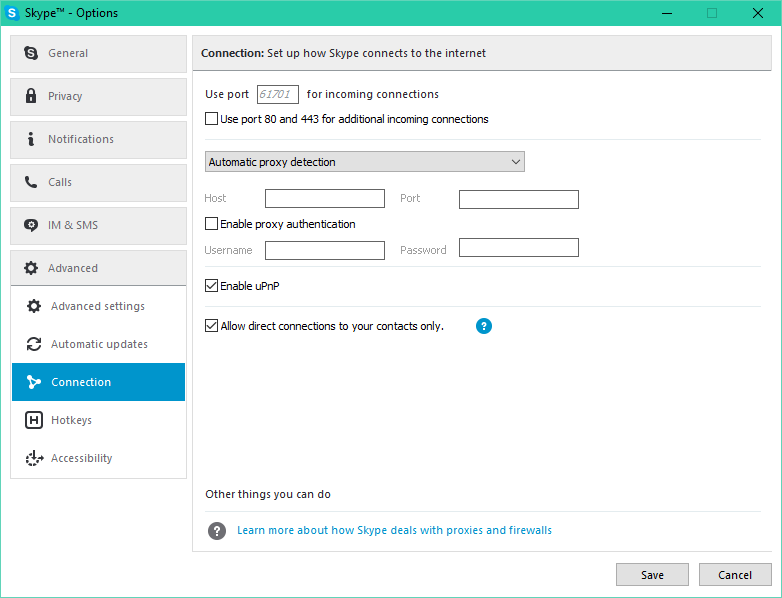
The information leakage is likely a relic of Skype's peer-to-peer nature; the IP address of each user had to be disseminated in order to enable direct peer-to-peer connections to those users. But for some time, the client has had an option to hide your IP address from people who aren't on your contact list. In this mode, any traffic between non-contacts goes through Microsoft's servers, and IP addresses aren't readily disclosed. Judicious use of this option protects your address from the various IP address lookup services, thereby protecting against denial of service attacks.

Read 1 remaining paragraphs | Comments

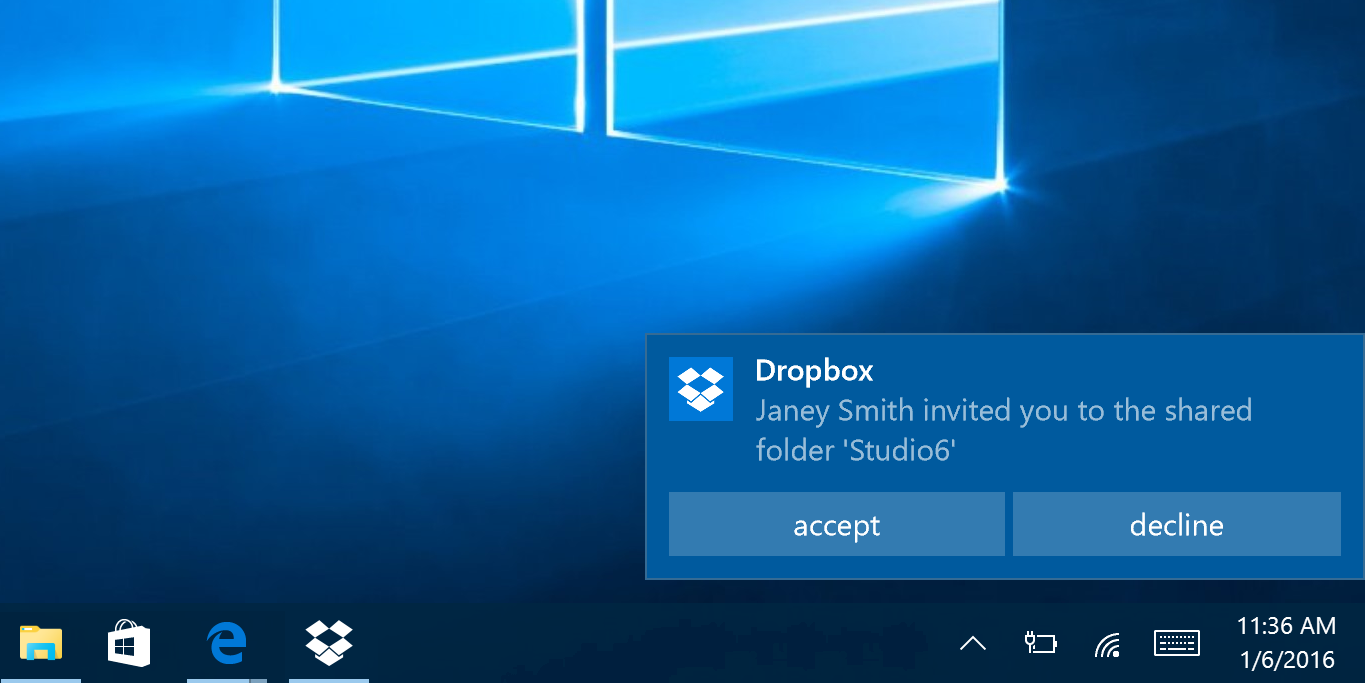
Dropbox’s new Windows 10 app shows the highs and lows of the platform

Dropbox has a nice Windows 10 app. I’m just not sure why I’d want to use it.

(credit: Microsoft)

Dropbox has updated its Windows 10 app. It's now a Universal Windows Platform app, with a mobile version promised soon, and it takes advantage of a number of features new to Windows 10 that weren't possible for Windows Store apps in Windows 8.

The Dropbox app allows you to (optionally) specify a passcode that has to be entered before it'll show your files, and this leads to its more exciting new feature: Windows Hello integration. While Windows Hello is so far mainly used for biometric authentication—the facial recognition used by the Surface Pro 4 and Surface Book, or fingerprint recognition in a range of laptops—that's not the full extent of it. There's a corresponding API that allows applications on Windows to tap in to the same biometric infrastructure. Instead of a four-digit PIN to reveal your files, the Dropbox app lets you use your face or finger.

It also has interactive notifications for invitations to shared folders that allow those invitations to be accepted or rejected from the notification itself.

Read 8 remaining paragraphs | Comments

Surface Pro, Pro 2, and Pro 3 power cords recalled amid overheating fears

The cables don’t take kindly to being bent or twisted.

A Surface Pro's power brick and cable.

Microsoft is recalling the power cords used by the Surface Pro, Surface Pro 2, and Surface Pro 3 due to concerns that the cables can overheat when they are wound too tightly, twisted, or pinched. The company will be offering free replacement cables to affected owners with a process that will be disclosed on Friday 22nd.

The recall notice appears to cover all Surface Pro-family devices sold prior to July 15, 2015. The new Surface Pro 4 is apparently fine.

Read on Ars Technica | Comments

Dell XPS 13 review: Skylake and Thunderbolt 3 make the best a little bit better

Incremental updates make for incremental improvements.

I liked the Dell XPS 13 an awful lot when I reviewed its initial Broadwell-based iteration last year. The keyboard and touchpad felt good, the high resolution screen looked great, and the whole package was stylish, with its super-thin bezel and soft-touch interior. The only major flaw was the webcam placement driven by that thin bezel. Some other publications also felt that battery life wasn't what it should be, but in our testing it seemed decent even if it fell short of Dell's own estimates.

Almost everything in that review holds true of the new device, and that's a good place to start. The XPS 13 got all the important basics right. Once again our review model has the beautiful 3200×1800 IPS touchscreen and the same extremely narrow bezel.

This is as eye-catching as it ever was, and I'm a little surprised that other manufacturers haven't leapt on the same hardware. The XPS 13 is quite a bit smaller than systems with comparable screen sizes, or if you prefer, its screen is quite a bit bigger than that of systems with the same footprint. To quantify that: the XPS 13 is 11.98 inches wide. The 11-inch MacBook Air is 11.8 inches wide, and the 13-inch MacBook Air is 12.8 inches wide. Similarly, the XPS 13 is 7.88 inches deep; the Apple systems are 7.56 and 8.94 inches deep. This Dell with its 13.3 inch screen is much closer in size to the Mac with an 11.6 inch screen than the one with a 13.3 inch one.

Read 25 remaining paragraphs | Comments

Build conference sells out in seconds, even with higher price and no hardware giveaway

It took just one minute for every spot to go.

San Francisco has a famous bridge that was designed to look like the Cisco logo. (credit: Microsoft)

Microsoft's Build developer conference will be in San Francisco once again, on March 30 to April 1. In spite of costing a little more this year, $2,195 (~£1,550) to last year's $2,095 (~£1,480), the conference sold out in record time. All tickets were gone within one minute. During the brief moment that tickets were available, there was much grumbling about site malfunctions and getting immediately placed onto the waiting list. That high traffic surge appears to be the reason why.

For everyone who didn't get tickets, the majority of the event will be streamed live, and session videos will no doubt be posted online. Steve Guggenheimer, the chief evangelist of Developer Experience, says that for next year, Microsoft is trying to get more attendee capacity. But that'll be too late for this spring's event.

Few details aside from the venue—the Moscone Center—and dates are currently known. Microsoft has yet to publish an agenda for the developer-focused event. The only thing we do know is that, unlike events of the past, there apparently won't be any hardware giveaways for attendees. This is sure to be a disappointment to anyone hoping to pick up a HoloLens headset from their trip to California. Instead, attendees are promised a "deeper technical experience for developers," though precisely what this means is unclear. Our hope is that it means better catering, which has been a particularly weak point of the last couple of Build events.

Read on Ars Technica | Comments

Skylake users given 18 months to upgrade to Windows 10

And next generation processors, including Intel’s Kaby Lake, won’t be supported in old Windows.

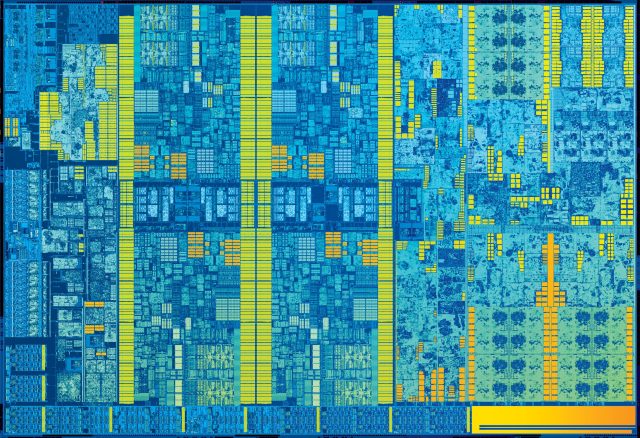
Intel Skylake die shot. (credit: Intel)

If you own a system with an Intel 6th generation Core processor—more memorably known as Skylake—and run Windows 7 or Windows 8.1, you'll have to think about upgrading to Windows 10 within the next 18 months. Microsoft announced today that after July 17, 2017, only the "most critical" security fixes will be released for those platforms and those fixes will only be made available if they don't "risk the reliability or compatibility" of Windows 7 and 8.1 on other (non-Skylake) systems.

The full range of compatibility and security fixes will be published for non-Skylake machines for Windows 7 until January 14 2020, and for Windows 8.1 until January 10 2023.

Next generation processors, including Intel's "Kaby Lake", Qualcomm's 8996 (branded as Snapdragon 820), and AMD's "Bristol Ridge" APUs (which will use the company's Excavator architecture, not its brand new Zen arch) will only be supported on Windows 10. Going forward, the company says that using the latest generation processors will always require the latest generation operating system.

Read 12 remaining paragraphs | Comments