Google Hangouts 7.0 for Android asks users to stop using it for SMS

Google seems to be backtracking on SMS support, points users to the regular SMS app.

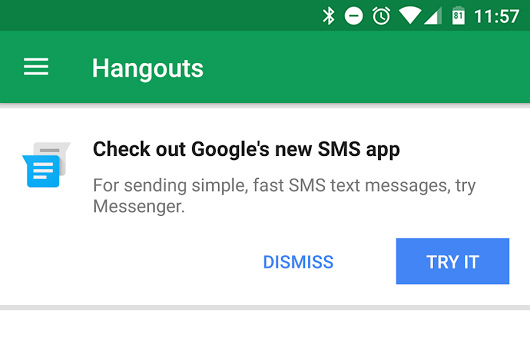
The new Hangouts message that asks you to stop using Hangouts.

Remember when Google finally integrated SMS into Hangouts, bringing Google's beleaguered IM client a little closer to Apple's iMessage? It seems like Google is now backing away from this strategy. In the newest update, Hangouts 7.0, the app now pops up a dialog box suggesting that you stop using Hangouts for SMS and switch to Android's standalone SMS client, "Messenger."

Google apps usually pop up messages like this when Google is preparing to remove or stop working on a feature. Hangouts posted a similar message when it first integrated SMS, and again when it integrated Google Voice, telling users to switch to Hangouts from whatever they were currently using. The message to switch to the SMS app was predicted by a Phandroid rumor a month ago, which said that this was the first step toward removing SMS support from Hangouts. For now, Hangouts wouldn't be able to completely remove SMS support since Project Fi users rely on it, but it seems that users of other carriers will be pushed to the regular SMS app.

Besides threatening to remove a major feature, 7.0 adds a quick reply function, which lets you type out a reply right from the notification panel.

Read 1 remaining paragraphs | Comments

Amazon reportedly seeks a bigger hand in Android phone software

Amazon is reportedly in talks with OEMs to “gain a bigger backdoor to Google’s Android.”

The failed Amazon Fire phone. (credit: Amazon)

After flopping with the Fire Phone, it seems Amazon is looking to dip its toe back into the mobile pool. According to a report from The Information, Amazon is hoping to partner with smartphone OEMs to deeply integrate its services into handsets. The report claims that Amazon "has discussed working with phone brands at a 'factory level' to integrate its services with devices in a deeper way than simply preloading apps."

"In essence, the retailer would like its partners’ phones to resemble Amazon’s line of Kindle Fire tablets that it builds on its own," the report states. The phones would be full of Amazon services and encourage people to become a member of Amazon Prime.

Amazon already dove into the phone market once with the Amazon Fire Phone, which the company released in July 2014 for $199 with a two-year contract, or $650 unlocked. Six weeks later, Amazon slashed about $200 off of both options and the price kept falling. The Fire Phone cratered at $130 for the unlocked version in August 2015, and it was pulled from the market shortly after. The Fire Phone flop resulted in a bunch of people getting fired from Amazon's hardware development center, and the company took a $170 million write down on the experiment in its 2014 Q3 financial report. The company's new plan sounds a lot like the Fire Phone, but Amazon would be letting someone else handle the hardware this time.

Read 5 remaining paragraphs | Comments

CarPlay vs Android Auto: Different approaches, same goal

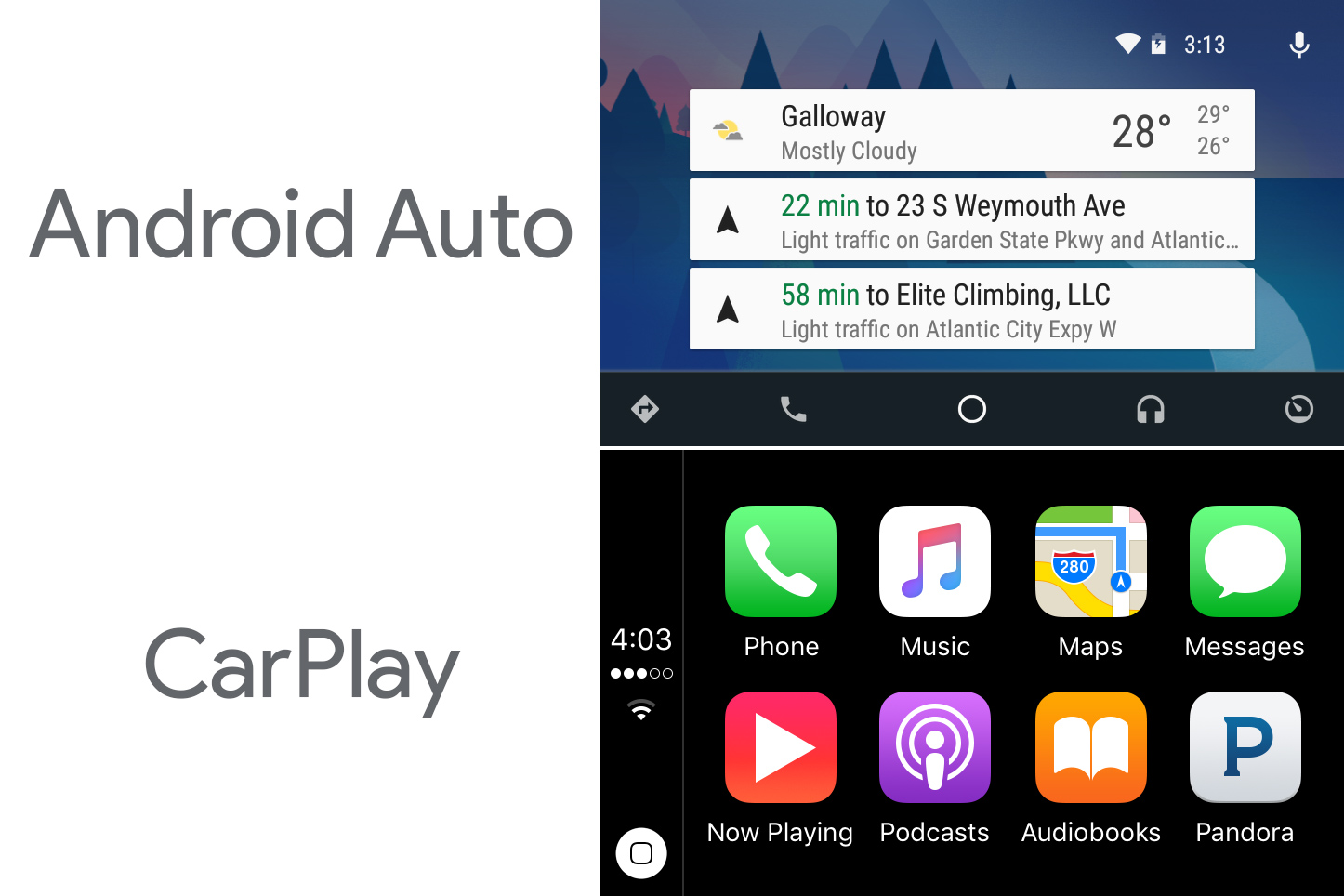
Gallery: We pit the main interfaces of Android Auto and CarPlay against each other.

Under the hood, CarPlay and Android Auto seem pretty similar. They're both "casted" interfaces that process and render a computing environment on a smartphone and then send that interface to the car display, basically using it as an external touchscreen monitor. The interfaces are wildly different though, with CarPlay sticking with the tried-and-true grid of apps, while Android Auto displays a notification dashboard and uses a tabbed interface. After having just looked at CarPlay and reviewing Android Auto last year, we figured a quick comparison was in order.

The first picture in the gallery covers the biggest differences between these two systems. CarPlay and Android Auto take completely different approaches to the system UI and home screen design, and this affects the entire way you use the device.

CarPlay's original name of "iOS in the car" pretty much nails Apple's goal here. CarPlay is basically the iOS smartphone/tablet interface enlarged 400 percent and simplified for car usage. The biggest change is the status bar, which morphed into a side-mounted bar showing the time, connectivity, and the on-screen home button. The icons are the star of the show here—they're big, bright, obvious, and easy to hit.

Read 7 remaining paragraphs | Comments

One week with Apple’s CarPlay

Pretend your awful stock car system doesn’t exist with Apple’s casted interface.

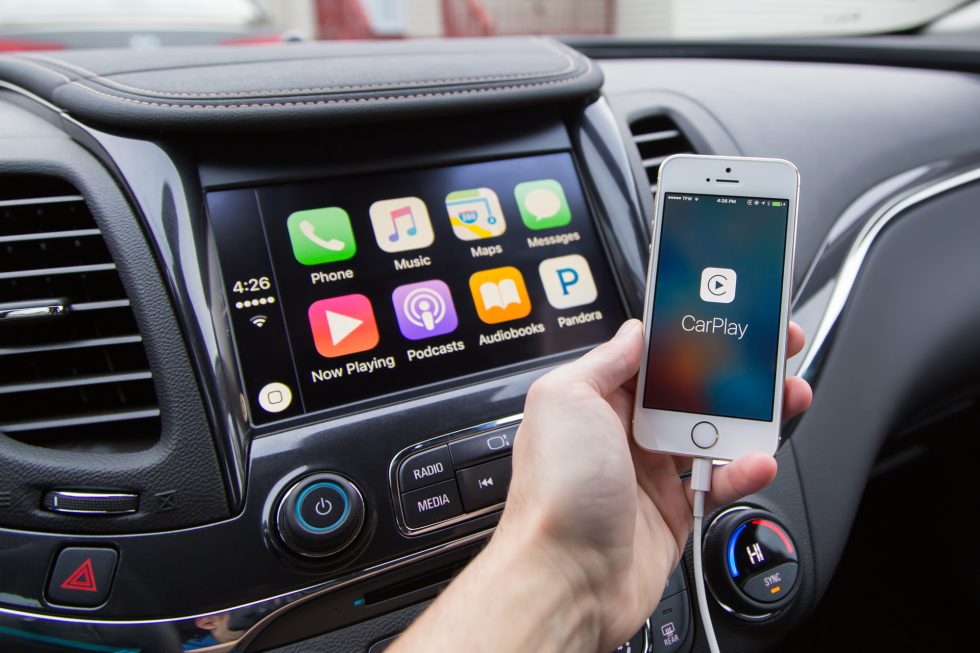
Banish your car's stock infotainment system to the background with CarPlay. (credit: Ron Amadeo)

If you buy a car today, it will probably come with some kind of touchscreen computer onboard. These are basically embedded tablet computers that run some kind of operating system, but rather than coming from Apple, Google, or Microsoft, the software comes from car manufacturers and their suppliers. Car companies don't have a ton of experience when it comes to software, so the integrated computers generally aren't designed very well. They also never have the app ecosystem we've come to expect from smartphones and tablets, so it's no surprise that many people still prefer using their smartphones over the in-car option.

Traditional software companies are getting a foothold in cars, though. We already reviewed Android Auto, and recently we got to spend some time with Apple's CarPlay. CarPlay seeks to combine the benefits of the in-car system—namely the big, bright touchscreen—with the design, apps, and functionality of iOS. Plug an iPhone into a supported vehicle and the stock infotainment system will go away while the iPhone beams an iOS-style interface to the car screen. From our time with CarPlay, this system appears built from the ground up for computing on the go, with an easy-to-use, safety-focused UI, a heavy emphasis on voice commands, and a sliver of the huge iOS app ecosystem.

To run CarPlay in your vehicle, you'll need a compatible car (Apple has a list here) or an aftermarket radio. Phone-wise, you'll need an iPhone 5/5c or newer. CarPlay updates come up fairly frequently, but this is CarPlay as it exists in iOS 9.2.

Read 41 remaining paragraphs | Comments

New Galaxy Note 5s have a fix for the stuck S-Pen issue

An extra piece of plastic stops a backward S-Pen from getting stuck.

Slide the pen in like this on older units, and it will get jammed. Removing it can break some S-Pen functionality.

Back in August during the launch of the Galaxy Note 5, an issue was discovered that could potentially break the device. If you stuck the S-Pen in backwards—pointy part first instead of flat part first—it would get stuck. From there, you'd have to forcefully remove the S-Pen, which could potentially break the top off the pen or damage the pen eject functionality.

Samsung's first response to the problem was to ship the Note 5 with a warning sticker on the screen, but now Phandroid has discovered that new Note 5s will offer a real, physical solution.

Pen detection on the Galaxy Note 5 was handled by an internal switch that the pen would hold down on when it was inserted. When put in backward, a void in the top of the pen would catch the spring-loaded switch, trapping the pen. Samsung has now put a flexible, plastic cover over the switch, which acts like a ramp. When the thinner part of the S-Pen passes over the switch in this setup, the ramped plastic allows the pen to press the switch down rather than catch it. (The cover also seems to be attached with adhesive tape.)

Read 1 remaining paragraphs | Comments
Alphabet’s robot division gets retooled as part of X research lab

After failing to find a “CEO” for a standalone unit, the group joins the X division.

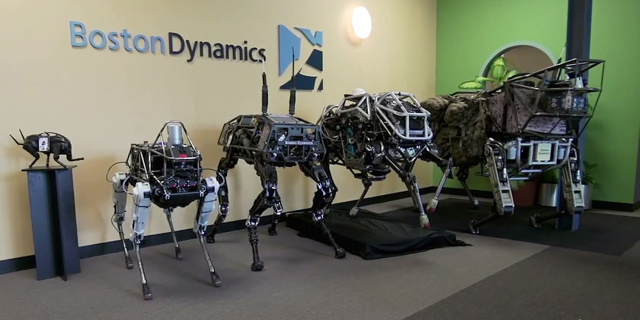
Boston Dynamics robots, from left to right: Little Dog (on pedestal), Spot, BigDog, WildCat, and LS3. (credit: Boston Dynamics)

As we reported in our 2016 Google preview, Alphabet's robot division is in a bit of a mess. The division was started inside Google by Android cofounder Andy Rubin, who aimed to quickly get the project up and running via an acquisition spree. He picked up Boston Dynamics, the DARPA Robotics Challenge winner Schaft, and about seven other companies. Then Andy Rubin left Google, leaving the collection of companies to fend for themselves. With no leader and not much of a direction, the group needed help.

Google has been searching for someone to replace Rubin and lead the Robotics group, and it looks like the group is finally getting some leadership in the form of Alphabet's newly renamed "X" group. A report from The New York Times says that the robot team will be moving to the X division, and Alphabet's moonshot group will "review the various projects and refocus them toward solving specific problems that would be reframed as a particular moonshot effort."

Moving the robot division into the X group reportedly wasn't Alphabet's first choice. The Information claimed Alphabet earlier tried to get Carl Bass, the CEO of Autodesk, to run the division, but questions about the group's relationship with the rest of Alphabet apparently caused problems.

Read 1 remaining paragraphs | Comments
Android launcher update adds auto-rotate, forces icon size consistency

Android developers won’t follow the guidelines, so Google is forcing apps to comply.

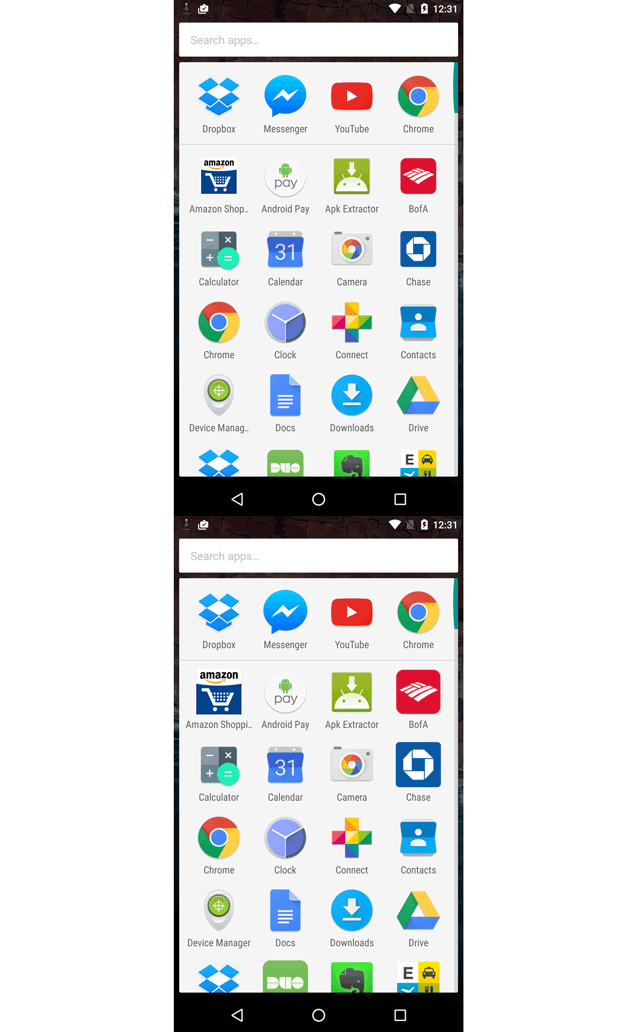
Icons now get forced to a standard size.

An update to the Google Now Launcher has brought some nifty new features to Android's home screen. Google is reining in unruly app icons to make everything a consistent size and adding auto rotate support to the launcher.

Google's icon design guidelines give developers the tools to create a consistently sized icon in many different shapes. Many developers totally ignore the guidelines in favor of just creating the biggest icon possible, which often leaves Android's app drawer and home screen an inconsistent mess. The recent launcher update fixes this problem by ignoring the app developer's wishes and normalizing all the icon sizes—big icons get shrunken down.

Google doesn't police its app store the way Apple does, and since asking nicely via the guidelines doesn't work, Google has turned to automatically reducing the size of icons via software. This idea was actually pioneered last year in the third-party app "Nova Launcher," which similarly made fat icons smaller with a software enforcer.

Read 2 remaining paragraphs | Comments

Google X loses the “Google,” gains a big yellow logo

The moonshot group drops its “Google” branding, evolves into an Alphabet incubator.

X's new logo. (credit: Re/Code)

A report from Recode gives us a nice update on the goings-on inside of Google X—Google/Alphabet's moonshot division—and the group has a new name and a new logo. It dropped the "Google" and is just "X" now, and you can the division's big yellow X logo above.

In The Google Tracker, we wondered if all the Alphabet companies with "Google" branding would end up getting renamed, and Google X is merely the latest division to drop "Google" once it left Google. We've also seen Google Ventures turn into "GV" (yes, just the letters), and Google Life Sciences become "Verily." The remaining non-Google products that use the "Google" name are Google Capital, Google Fiber, and Google Self Driving Cars.

The report says X is "sharpening its focus" and "framing itself as Alphabet’s incubator." X remains Alphabet's moonshot factory—it's there to evaluate ideas, build working solutions, and spin the projects out into Alphabet companies. The report says a new group inside X, called the "Foundry" is "creating tighter criteria" on when these projects get to live or die.

Read 2 remaining paragraphs | Comments

Remix OS—a multitasking, windowed Android OS—can now run on your PC

An “alpha” build of the OS for a generic PC is available for download.

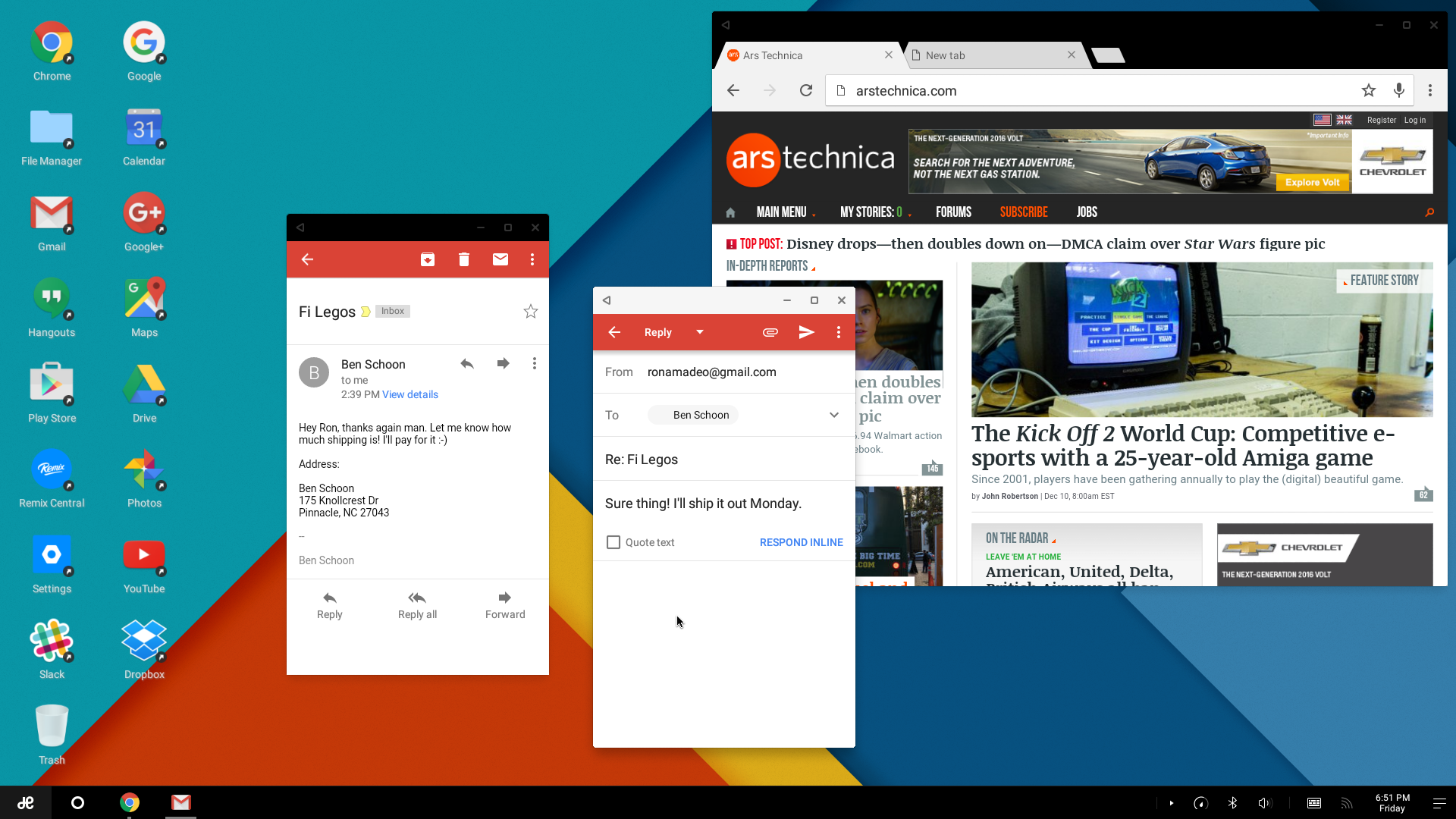
Jide's Remix OS—a... well, remixed version of Android that is more suitable for a PC's mouse and keyboard—is now available for download. The OS turns Android into a windowed desktop environment with the ability to multitask, just like Windows, Mac OS, and desktop Linux.

The OS is available today as a 700MB "alpha" version, which you should be able to run on your own hardware. The project's webpage says it is compatible with "most computers in the world powered by x86 chipsets," and it seems to require a 64-bit CPU. Remix OS is based on the long-running Android-x86 project, which has a crowdsourced hardware support list here, but the bottom line seems to be "try it and see what happens." You'll need at least an 8GB USB 3.0 flash drive with a recommended write speed of 20MB/s along with a PC with a "USB legacy" boot option.

We tried Remix OS at the end of a recent article that looked at Android on the desktop. The OS definitely proved nicer than vanilla Android with a mouse and keyboard, but just like with Android tablets, the biggest software weakness is app support for the new environment. Remix actually comes out a little better here, since if you get stuck with a phone app, you can usually just shrink it down to a phone-sized window. The other big weakness in our test setup was the hardware: Jide's own "Remix Mini" was woefully underpowered for serious multitasking, but with Remix now available for lots of hardware, you can fix that problem yourself.

Read 1 remaining paragraphs | Comments

2016 Google Tracker: Everything Google is working on for the new year

Android N, a big VR program, Google Glass, and lots more are in store for Alphabet.

Our current understanding of Alphabet's layout. (credit: Ron Amadeo)

It's that time of the year again—welcome to the Google Tracker! This is a bi-annual series where we recap every ongoing project (that we know about, at least) inside of Google's sprawling empire.

Though from now on, perhaps we should say, "Every ongoing project inside of Alphabet's sprawling empire." "Google" is now a mere company inside of "Alphabet," the newly formed umbrella company created by Google's founders. Most of the Google side projects we've been tracking in the past have been spun off into companies inside of Alphabet, but rest assured we're still keeping track of everything.

As always, the Tracker is a big roundup of previous announcements, rumors, and a bit of speculation. The 2015 entries worked out well—the Chromecast 2, Google On, Google Photos, YouTube Gaming, and tons of Android features were represented. We can't promise everything listed here will be released in 2016, but this is certainly a running list of everything we've heard about. If you've been slacking all of 2015 and not paying attention to the news, consider this your "Google CliffsNotes" for the upcoming year.

Read 171 remaining paragraphs | Comments