Report: “YouTube Connect” will be a livestreaming Periscope competitor

News of yet another live YouTube service surfaces.

VentureBeat has the scoop on another YouTube service: YouTube Connect. Connect would be a livestreaming service which would take on "spur-of-the-moment" live video services like Facebook Live and Twitter's Periscope.

The report says the service would include apps on Android and iOS with "much of the same functionality" as Periscope and Facebook Live. Streaming would be immediate and paired with chat and "tagging" features. There is supposedly even a "news feed" that would list videos from friends and your YouTube subscriptions. Live broadcasts would be saved for later on-demand viewing and would show up on the content creator's YouTube channel.

The new service would be yet another expansion of the YouTube brand and app lineup. Including Connect, YouTube's video empire would be spread across a whopping seven apps: the regular YouTube app, YouTube Gaming, YouTube Music, YouTube Kids, YouTube Creator Studio, and YouTube Capture. There is also the umbrella subscription service YouTube Red.

Read 3 remaining paragraphs | Comments

Report: Google is building an Amazon Echo clone, Nest has a security system

Alphabet’s smart home ambitions leak, but can a “stalled” Nest division deliver?

The Amazon Echo. Imagine this with Google inside. (credit: Amazon)

The Information has just posted a massive info dump on Nest, painting a picture of a "stalled" company with sales that haven't lived up to expectations and a seemingly rough internal culture. The report says there has been an "exodus" of employees, with more than half of the 100 employees from the Nest-acquired Dropcam walking away from the company. Dropcam co-founder Greg Duffy was part of that exodus, reportedly calling Nest CEO Tony Fadell a “tyrant bureaucrat” on his way out.

Fadell spoke to The Information as part of the report, saying that “A lot of the [Dropcam] employees were not as good as we hoped.” One of the most interesting things Fadell mentioned is that Alphabet is entering a "fiscal discipline era" and asking its subsidiaries for business plans for the year. This comes on the heels of an earlier report that said Alphabet was looking to dump robotics company Boston Dynamics after it supposedly lacked a real product and didn't want to work with the rest of Alphabet.

Drama aside, the report also contains a list of upcoming Google and Nest products. The most interesting is a "Google Voice Recognition device" that "competes with Amazon Echo." The Echo is basically a Wi-Fi speaker with voice recognition technology—think "Siri in a box." Google has all of the voice tech nailed down from its efforts on Android and Google.com, so it's easy to imagine building the existing Google app capabilities into a standalone device. Nest originally wanted a hand in the project but was denied by Google. As for the timing of such a device, the report says it's "unclear when Google will release the device and there’s still a chance it won't be released at all." Previously, the well-sourced Artem Russakovskii of Android Police briefly mentioned an Amazon Echo competitor in development at Google, codenamed "Chirp."

Read 4 remaining paragraphs | Comments

Google to take on Nuance with speech recognition API

Google’s “Cloud Speech API” enters limited preview in 80 languages.

If you want to build a product with speech recognition capabilities, Nuance has been the default choice for some time. The company's technology powers Apple's Siri and Samsung's S-Voice as well as car computing interfaces from BMW, Chrysler, Ford, and many other automakers. Google has had its own voice recognition service for some time, but previously it was only used in Google-branded products like the Google app, Google keyboard, or Google.com. Now that voice recognition technology is being opened up to developers. At its NEXT cloud platform conference, Google announced the Cloud Speech API.

The new API will bring Google's voice technology to the masses, and it seems to work pretty much the way it does in Google products today. Speech is streamed up to the cloud and back in real-time, including partial "type-as-you-speak" results. The transcribed text can be dumped into an input field for voice transcription or used for a "command and control" feature, like bossing around a robot. Google's speech API can handle 80 languages and variants, while its now-rival Nuance only seems to support 38. As part of the Google Cloud Platform, we'd imagine it needs a constant Internet connection to work.

For now, the cost of the Cloud Speech API, which is only in a "limited preview," is free. Google says it "will introduce pricing in future phases." The preview seems to be invite-only, but interested developers can fill out this page and hope they get accepted.

Read on Ars Technica | Comments

Report: Google is building an iOS keyboard

The keyboard is said to integrate Google Search into your everyday typing.

The Google Keyboard for Android.

A report from The Verge claims that Google is working on a third-party keyboard for iOS. The site says the keyboard would include "a variety of search options," a description that suggests it will be more than a copy of Google's Android keyboard.

According to the report, the keyboard has "been in development for months," and is "visually distinct" from Google's Android keyboard. The usual Android Google Keyboard features are here, like gesture typing, but on iOS you'll be able to "tap the Google logo" to jump to traditional web search. The report says there are "distinct buttons for pictures and GIF searches," all apparently designed to push users to do more Google Searches.

Apple added support for third-party keyboards in iOS 8, and since then we've seen the usual Android keyboard developers bring over their work. Companies like Swype, Swiftkey, and Fleksy made the jump, and now Google is following suit.

Read 3 remaining paragraphs | Comments

Xiaomi Mi 5 review: It’s hard to argue with $305 for a Snapdragon 820

Xiaomi’s software needs a serious upgrade, though.


While Samsung and its Galaxy S7 mostly competes with high-end devices like the iPhone, Xiaomi makes its money attacking the mid- and low-end of the market. The company is all about bang-for-your-buck, often delivering very good specs at low prices. How low? Like most flagships, the Xiaomi Mi 5 sports the new Snapdragon 820 processor and a USB Type-C port, all for the distinctly not-flagship price of RMB 1999 (~$305). You could buy two of these for the price of a Galaxy S7 or LG G5. The catch is that the Mi 5 is currently only available in China.

But the Mi 5 might be the phone that Xiaomi uses to finally break into the Western market. Despite its name, Mobile World Congress generally focuses on phones for Europe and the US, and Xiaomi's first-ever appearance may be a sign of things to come. Xiaomi is also sending review units to a few US press outlets—we didn't import this one. The company opened online stores for products like its earbuds and headsets in the US, UK, France, and Germany, but the stores don't sell smartphones yet.

Design and build quality

SPECS AT A GLANCE: Xiaomi Mi 5
SCREEN 1920×1080 5.1" (428ppi) LCD
OS Android 6.0 Marshmallow with MIUI 7
CPU Quad-core Qualcomm Snapdragon 820

Standard: (two 1.8GHz Kryo cores and two 1.6 GHz Kyro cores)

Pro: (two 2.15GHz Kryo cores and two 1.6 GHz Kyro cores)

RAM Standard: 3GB

Pro: 4GB

GPU Standard: 510MHz Adreno 530

Pro: Standard: 624MHz Adreno 530

STORAGE Standard: 32GB or 64GB

Pro: 128GB

NETWORKING Dual band 802.11 a/b/g/n/ac, Bluetooth 4.2, GPS, NFC
BANDS GSM/EDGE: 850/900/1800/1900MHz
UMTS/WCDMA: B1/2/5/8
TD-SCDMA: B34/39
LTE (FDD): B1/3/7
LTE (TDD): B38/39/40/41
PORTS USB Type C, 3.5mm headphone jack
CAMERA 16MP rear camera with phase detection autofocus and OIS, 4MP front camera
SIZE 144.6 x 69.2 x 7.3 mm (5.69 x 2.72 x 0.29 in)
WEIGHT 129g (4.55 oz.)
BATTERY 3000mAh
STARTING PRICE Standard: RMB 1999 (~$305) unlocked

Pro: RMB 2699 (~$415) unlocked

China only

OTHER PERKS quick charging, IR blaster, notification LED

The Mi 5 is very much a "budget flagship" phone: it feels and performs like a high-end device, but Xiaomi saves money by trimming features where most customers won't notice. The Mi 5's Snapdragon 820 only runs at 1.8GHz instead of the 2.15GHz you'd get on a Galaxy S7. The Mi 5 skips the crazy smartphone display resolution wars by going with a sensible 5.1-inch 1080p screen. The 428 PPI will lose a spec sheet battle with a 577PPI Galaxy S7, but when you consider an iPhone 6S only has a 326 PPI screen, 428 PPI is just fine. You get "only" 3GB of RAM, a full 1GB less than you'd get on the S7, but that's still plenty. There's no out-of-control spec creep, and you even get some important extras, like a fingerprint reader, NFC, an IR blaster, dual SIM cards, and the USB Type-C port I mentioned earlier.

Read 32 remaining paragraphs | Comments

This is Android N’s Freeform Window Mode

Android gets a desktop-style floating window mode, and there’s even mouse support.

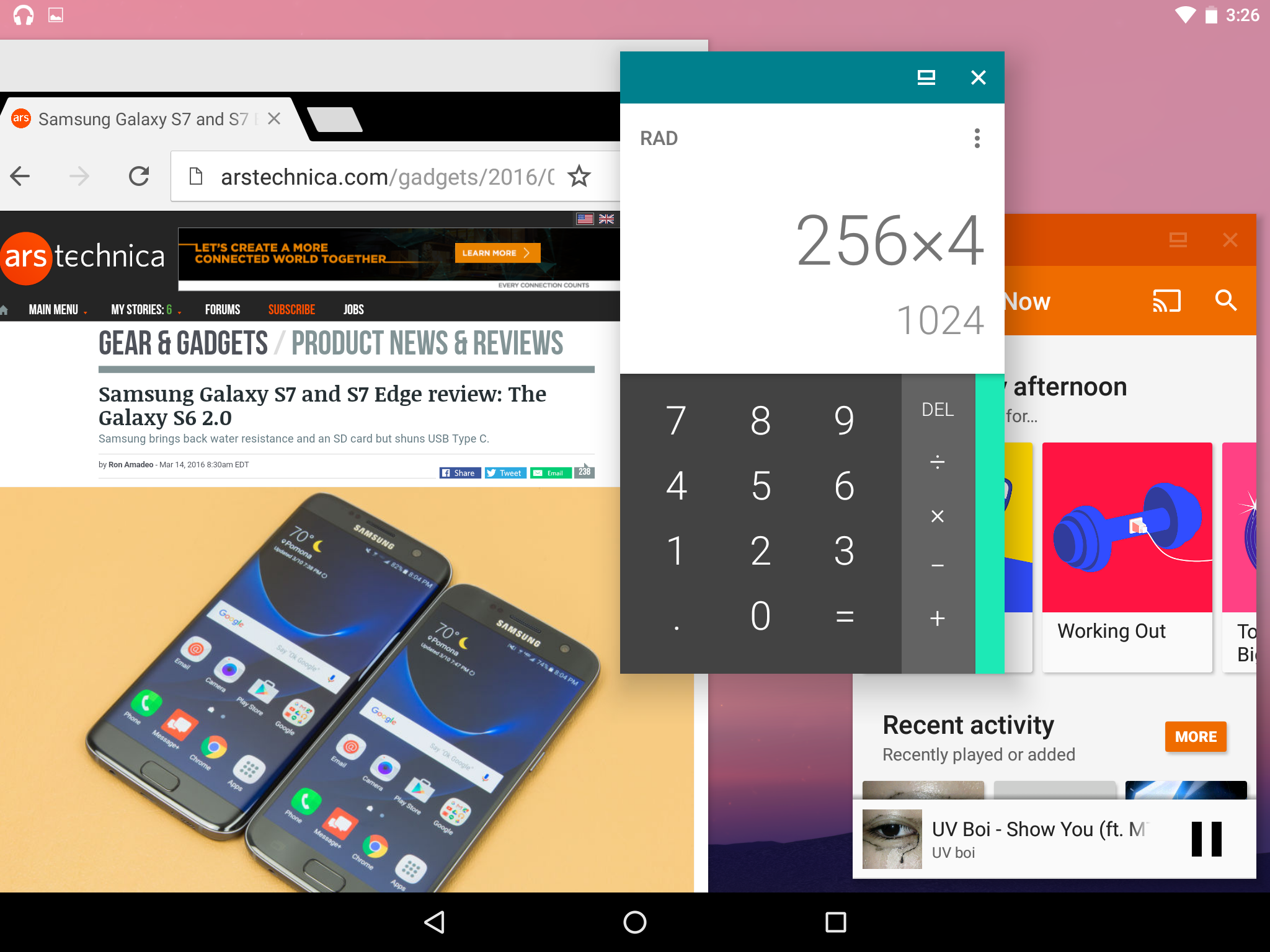
Last week we wrote about the "Freeform Window" mode in the Android N Developer Preview. Brief mentions in the developer documents and hints in the code pointed to Android someday displaying apps in resizable floating windows, just like a desktop OS. Freeform window mode isn't normally accessible in the current dev preview, but shortly after the post, we were contacted by reader Zhuowei Zhang with instructions on how to make it work.

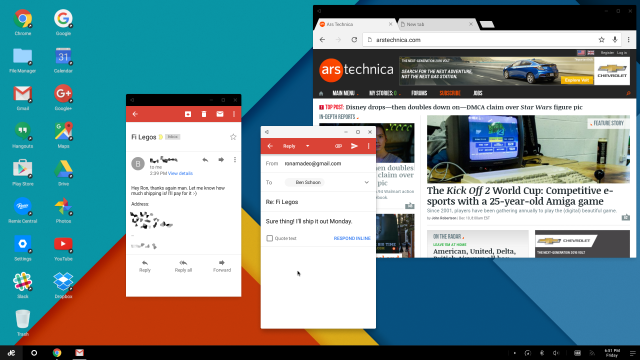
We'll get to the instructions, but first let's talk about what's actually here. Freeform Window Mode is just what we imagined. It's a dead ringer for Remix OS—multiple Android apps floating around inside windows—and it might be the beginnings of a desktop operating system. It works on Android N phones and tablets, and once the mode is enabled, you'll see an extra button on thumbnails in the Recent Apps screen. To the right of the "X" button that pops up after a second or two, there will be a square shape—the same ugly placeholder art Google used for the split screen mode in the Android M Developer Preview.

Press the square symbol for an app and you'll be whisked away to a screen showing that app in a floating window that sits on top of your home screen wallpaper. The windows aren't floating above the Android desktop; the background is just a blank wallpaper without any of your icons or widgets. The floating apps all have title bars like in Recent Apps. You can drag the apps around by the title bars or use the close and maximize buttons. Apps can be resized exactly how you would expect—press or hold on the edge and move your finger, and you'll see the app change shape. Just like in split-screen mode, apps will auto-switch between their tablet and phone layouts (with some apps dealing with this better than others). You can only resize in one direction at a time, though; there doesn't seem to be a corner hotspot that will let you adjust the width and height.

Read 11 remaining paragraphs | Comments

Google reportedly puts Boston Dynamics up for sale

Google quits robots? Remaining staff told they could be “reassigned to other things.”

We had heard whispers that Google parent company Alphabet's robotics division was in trouble, but we never expected something like this. A report from Bloomberg says that the company is looking to sell Boston Dynamics. Boston Dynamics is easily Alphabet's highest-profile robotics company, regularly showing the world its creations through its YouTube account.

Alphabet's robotics division, internally called "Replicant," was created by Android founder Andy Rubin in 2013. To jump-start the division, he snapped up eight robotics-related companies in about six months, including Boston Dynamics. After only a year at the helm of the new division, though, Andy Rubin left Google.

The sale of Boston Dynamics lines up with an earlier report from Business Insider, which said that Google's hodgepodge of companies had "little in common" and were "scattered across different countries and working on unrelated projects." The loss of Rubin apparently greatly impacted Replicant, and the BI report said that "many of the people who had joined Google through the robotics M&A felt confused and disappointed." Bloomberg's new story backs this statement up, saying the division "was plagued by leadership changes, failures to collaborate between companies, and an unsuccessful effort to recruit a new leader."

Read 2 remaining paragraphs | Comments

Forget split screen—Android N code hints at a “Freeform Windows” mode

Remember those “Desktop Android” rumors? Android N has a hidden multi-window mode.

Don't get too excited—this is just Remix OS. Imagine something similar, though.

One of Android N's headline features is a new split-screen mode that lets you run two apps side by side. It's a great multitasking feature for tablets, but it looks like Google is gearing up to take things one step further. We haven't been able to get it to work, but hidden in the code of Android N are references to an "experimental freeform windows" mode.

There are several references to this mode in "framework-res.apk"—a major Android system file. The most obvious references are these strings, which are meant for the settings screen:

<string name="enable_freeform_support">Enable freeform windows</string>
<string name="enable_freeform_support_summary">Enable support for experimental freeform windows.</string>

In the framework file, these strings are listed next to other settings in the "Developer Settings" screen, but we haven't been able to get the checkbox to actually appear. These exact strings pop up in a few other places, too, like the SystemUI and SetupWizard. The framework seems to be the main location, though. The framework also contains references for the new "close" and "maximize" buttons that a feature like this would require. The SystemUI gets in on the fun, too, with references to a "recents freeform workspace" (probably referencing the recent app list).

Read 7 remaining paragraphs | Comments

Samsung Galaxy S7 and S7 Edge review: The Galaxy S6 2.0

Samsung brings back water resistance and an SD card but shuns USB Type C.


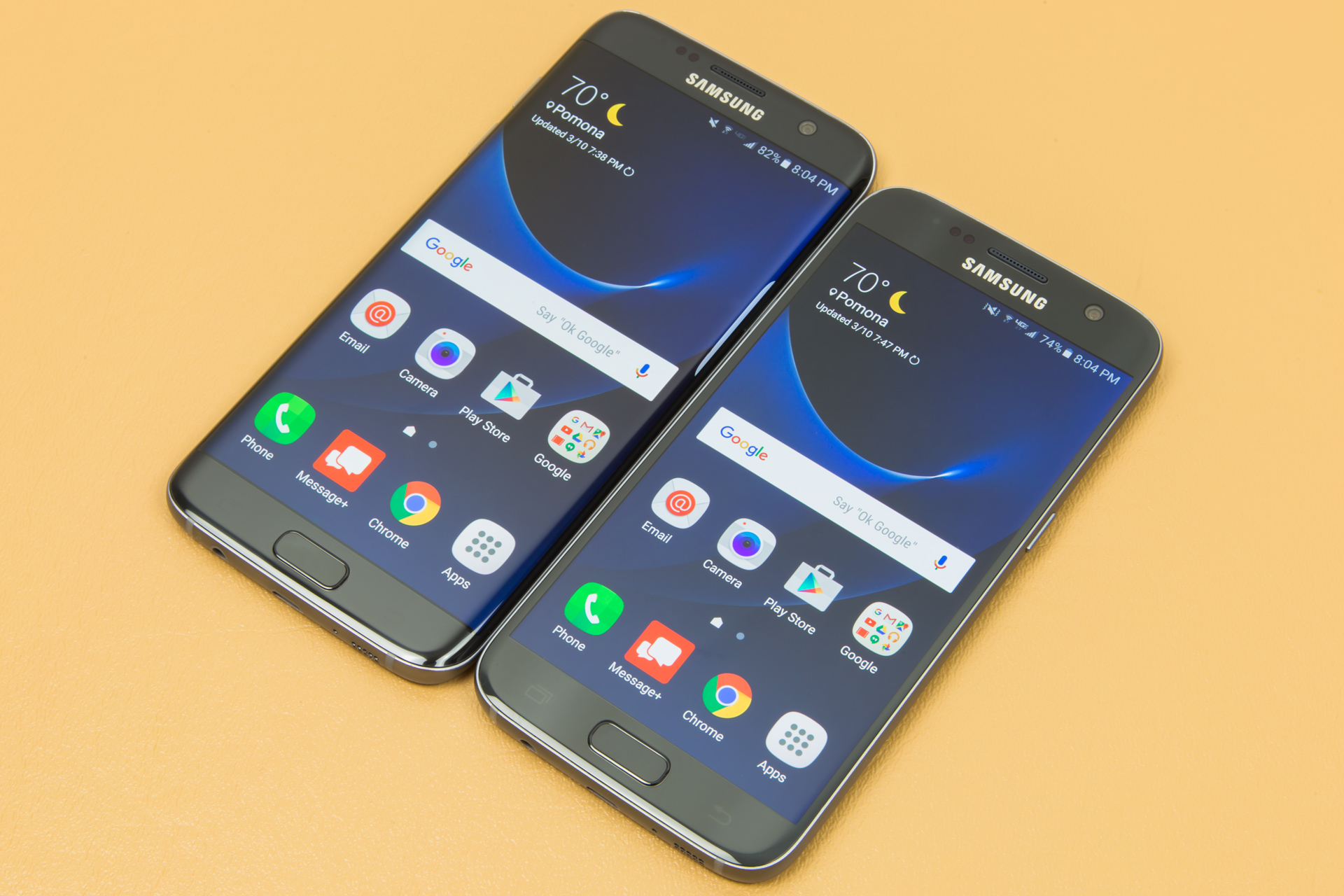
The Galaxy S7 and S7 Edge are finally here. Samsung's newest flagships stick pretty close to the Galaxy S6 formula, but they add a brand new SoC—the Snapdragon 820—and bring back some of the features the Galaxy S6 missed out on.

While we liked the Galaxy S6's overall evolution, you didn't have to look far to see people that saw the handset as a step backwards. Galaxy S5 customers complained that "upgrading" to the Galaxy S6 would mean losing the MicroSD slot, removable battery, water resistance, and Micro USB 3.0 port. In response, Samsung has re-introduced some features from the Galaxy S5 back into the Galaxy S7. The MicroSD slot is back, as is the water resistance. The water resistance is actually improved—you'll no longer have to fiddle with the clunky, unreliable port cover to protect the S7's innards.

The device still isn't a straight upgrade for Galaxy S5 owners, though. The removable battery isn't making a comeback; it's firmly fixed in place on this latest Galaxy phone. You won't get those USB transfer speeds back either—the Galaxy S7 still has a MicroUSB 2.0 port, making it the last flagship to not upgrade to USB Type C. You're also missing out on an IR blaster, which was present on the Galaxy S5 and S6.

Read 42 remaining paragraphs | Comments

Hands-on with Android N: Increased customization, better notifications, and more

We cover everything new we could find in Android’s latest update.

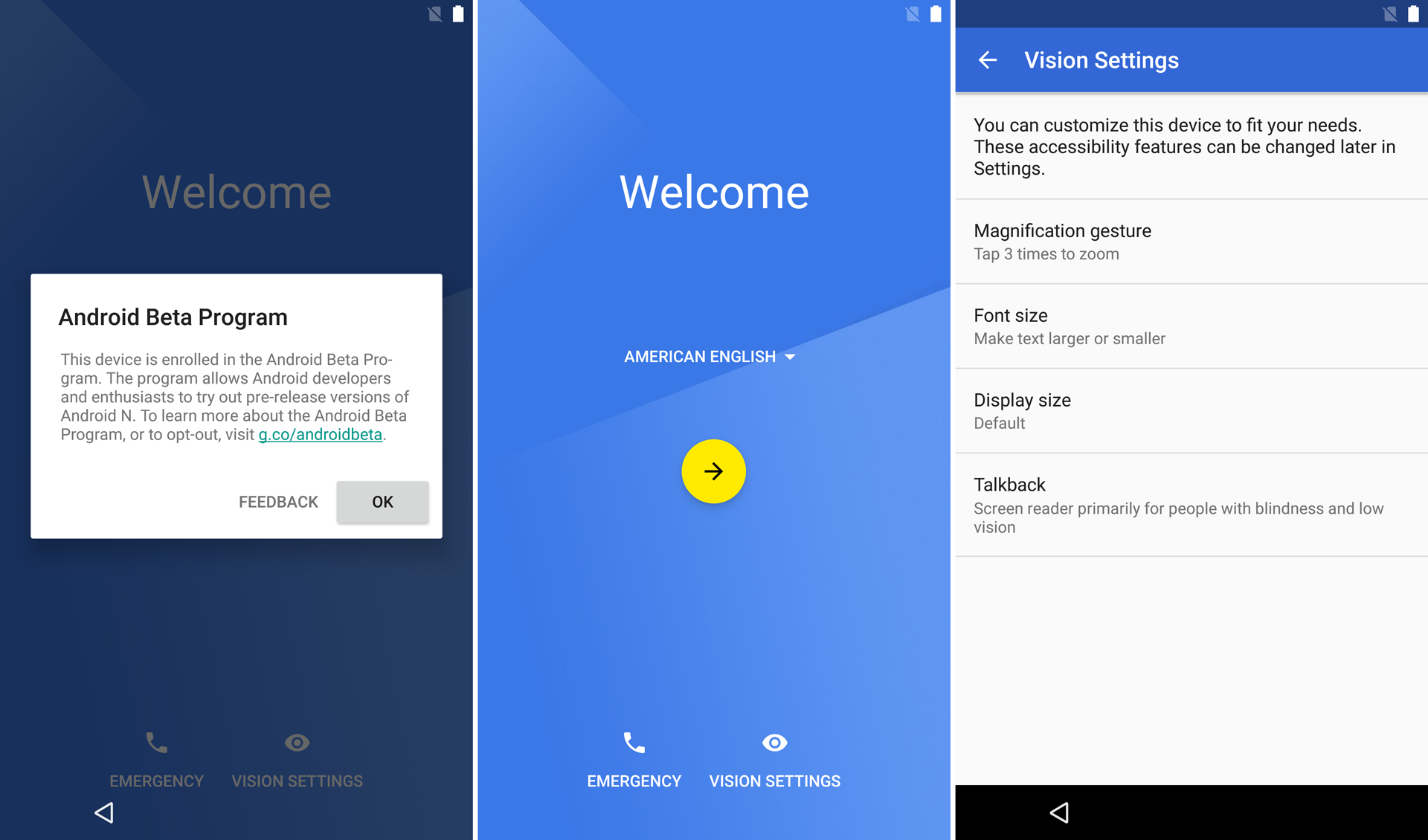
The Android N Developer Preview is out, bringing split screen and a redesigned notification panel among many new Android tweaks. How much more new stuff is what we're here to find out. We already covered the biggest addition—split screen mode—but with the dev preview flashed on a device, we set out to see what else Android N had in store.

Keep in mind this is just a developer preview, and everything is subject to change. The last developer preview, Android M, had all sorts of wacky additions that didn't make it to a consumer version of Android, like an app drawer with huge letter headings and a user-selectable theme setting. Tons of stuff could change between now and release.

One of the coolest new settings that is immediately available is the "Display Size," which lets you adjust the size the entire interface is rendered at. Changing it to a lower setting allows you to see more content on-screen at once, making big-screened devices much more useful. When the massive Nexus 6 was released, we complained that the large screen wasn't very useful, but this potential feature along with multi-window capabilities suddenly changes that. This setting (internally called the software "DPI") was a common thing for modders to change, and now it's freely accessible in the settings under Display > Screen Size.

Read 16 remaining paragraphs | Comments