Antimalware software works, hackers still trying to exploit 6-year-old bugs

Latest Microsoft security report confirms: There’s a lot of malware out there.

Microsoft has released the latest edition of its twice-annual Security Intelligence Report, its survey of the security landscape and threats around the world. The survey has a ton of data about what malware is infecting people, which parts of the world are seeing more attacks, and more.

For the first time, this report includes data that Microsoft has collected from its cloud operations. Azure Active Directory, handling logins for corporate Office 365 customers, has some 550 million users across 8.24 million customers and handles 1.3 billion logins a day. The Microsoft Account system used for consumer products handles more than 13 million logins per day.

This generates a ton of data, and Microsoft uses this data in machine learning systems to build models of what normal user behavior looks like and detect anomalies. Capabilities like this are used in the new Windows Defender Advanced Threat Protection, and today's SIR gives some quantification to them.

Read 5 remaining paragraphs | Comments
As free upgrade nears its end, Windows 10 passes 300 million users

The one billion user target is still a long way off.

Windows 10 is now on more than 300 million active devices, according to numbers released today by Microsoft. It continues to be the most rapidly adopted version of Windows ever. At the end of March, Microsoft said that the operating system had hit 270 million active users.

The Windows 10 release is, of course, unlike any past version of Windows in two important ways. First, the operating system was released as a free upgrade for many users of Windows 7 and Windows 8. Second, the operating system is offered as a regularly updated "service"; rather than waiting years for a new version of Windows before new features can be added, Microsoft is adding new capabilities in periodic updates. The next of these, the Anniversary Update, is due this summer and will add richer pen/stylus support, the ability to run some Linux programs natively, and extensions to the Edge browser.

Microsoft's original stated goal was to have 1 billion Windows 10 users within the first two to three years. At the current rate of adoption, this seems plausible, though sustaining the current uptake rate over three years will be a challenge. Making this harder is the imminent demise of the free upgrade program. After July 29, upgrading from Windows 7 or 8 to Windows 10 will cost $119.

Read 2 remaining paragraphs | Comments

Microsoft unveils new effort to make its developer, IT documentation great again

Docs written in Markdown, with fixes submitted through GitHub.

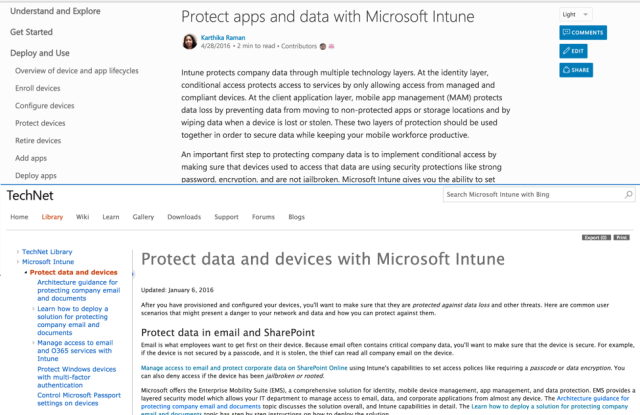
Above: the new docs.microsoft.com appearance. Below: the same article in old TechNet. (credit: Microsoft)

Microsoft's developer documentation used to be the model that all others should follow. The documentation itself was thorough, combining reference material with usage guides and sample code. Its use of, at the time, novel JavaScript and XML techniques (known in those days as dynamic HTML, or DHTML) made it easy to browse through the documentation and quickly switch between related portions. But successive "updates" to MSDN Library have made it harder and harder to use, obscuring the consistent structure and organization and becoming much less useful to developers as a result. These updates had other side effects, often breaking URLs, so that both internal and external links to the documentation broke or bounced you through numerous redirects.

After years of ad hoc changes to its documentation system, Microsoft has announced a new plan to overhaul both its TechNet and MSDN documentation to make it fit for the purpose. Documentation will have a new site, docs.microsoft.com, with a new consistent look and features.

Some teams within Microsoft, such as those developing ASP.NET and .NET Core, had already open sourced their documentation. On the new site, all documentation will be handled similarly. Every article will have an "edit" button enabling changes and fixes to be proposed. These changes will be handled as pull requests on GitHub, with the documentation itself using the popular Markdown markup language. All pages will also have both commenting and annotating using LiveFyre, putting an end to the ugly commenting system currently used.

Read 4 remaining paragraphs | Comments

HP’s new All-in-One is sleek, borderless, and has a really neat webcam

Smart all-in-ones and attractive laptops are the highlights of HP’s spring collection.

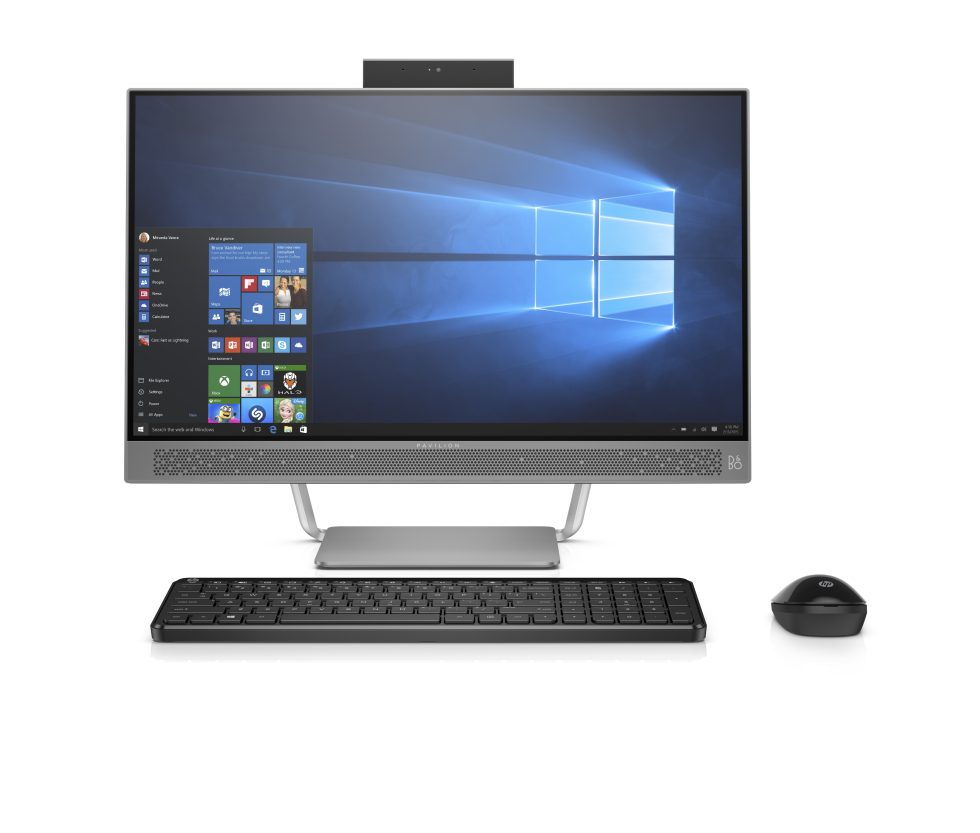
Push down on the rectangle at the top and it retracts inside the system, disconnecting the webcam and microphone. (credit: HP)


HP has been impressing us lately with some of its system design—the new Spectre laptop is particularly eye-catching. A new all-in-one desktop announced today is similarly striking. The name is a little ungainly—the HP Pavilion All-in-One with Micro-Edge Display—but while not rolling off the tongue, it sure is descriptive. The 23.8-inch non-touch IPS display has a narrow bezel of just 6.4 mm, bringing the same kind of slimline look that we've been fans of since the Dell XPS 13 came onto the scene.

In the flesh, the machine is extremely good looking, and the narrow bezels make it really stand out. It's a system that'll look good both at home or in the office, with the narrow bezel almost imperceptible.

With prices starting at $749.99, the Pavilion offers a range of Intel Skylake processors, and optional Nvidia GT 930A graphics. This isn't going to be the fastest system ever built, but it should be more than able to handle most things that people throw at it, even light gaming at its native 1920×1080 resolution should be within reach. It can be equipped with up to 16GB RAM and 1TB hybrid disk. Connectivity includes USB Type-C, traditional USB 3.0, Ethernet, 802.11ac Wi-Fi, and HDMI out.

Read 4 remaining paragraphs | Comments

Cortana Web searches in Windows 10 will now only be able to open Edge and Bing

Cortana’s growing power means she can’t use third-party search and browsers.

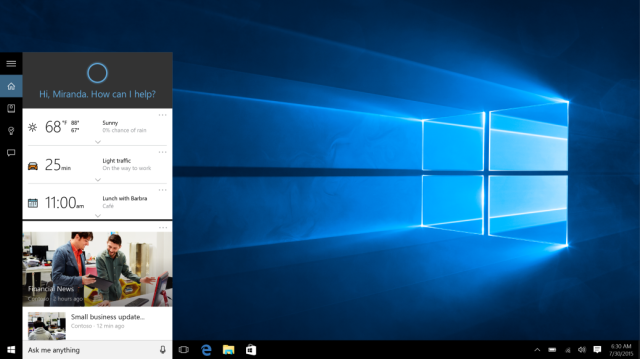
Cortana at work in Windows 10. (credit: Microsoft)

Windows 10 will still let you pick a default browser that isn't Edge, and even if you use Edge or Internet Explorer, it will continue to let you pick a default search engine other than Bing. But in a change which goes into effect today, Web searches that use the Cortana-driven search box in the Windows 10 taskbar will no longer give you any choice: they will always open in Bing, and they will always use Edge to do so.

Microsoft explains that it is making this change because of the smarter capabilities that it has built in to its Cortana digital personal assistant, and the integration this requires of the browser and search engine. For example, the company says that a search for "Pizza Hut" in Cortana will, when opened up in Edge, show locations and directions and rich information. Plans are afoot to make this feature more capable and extensive; eventually you will be able to ask Cortana to "get tickets to Rihanna show," and Windows will find appropriate tickets and streamline a customer's purchase.

This integration requires a common understanding of entities and semantic information about what is being searched for, and how to present this data. Microsoft can offer that in its own platform, but has no consistent, reliable way to do this with other browsers or search engines.

Read 1 remaining paragraphs | Comments

Call of Duty 4: Modern Warfare remake announced with poop-pants emoji

Much-loved first-person shooter is being remade for PlayStation 4.

A remake of Call of Duty 4: Modern Warfare is apparently in the works after the official Call of Duty Twitter account replied to a 16-month-old tweet with two emoji: pile of poo and jeans.

In December 2014, Angus Varderslott announced that he would "literally shit [his] pants" with excitement if he ever learned of a Call of Duty 4 remaster. Call of Duty 4 was a landmark title. It was the first Call of Duty game set in the present day, after a series of World War II-themed titles, and it set the standard for "cinematic" first-person shooters. While these days the series is derided as being rather formulaic and linear, the first Modern Warfare title held genuine surprises, with an extraordinarily tense sniper mission in the ruins of Pripyat (the Ukrainian city abandoned after the Chernobyl disaster) and the death of one of the player characters in the aftermath of a nuclear strike.

The tweet reply suggests that Varderslott had better take a trip to the laundry.

Read 1 remaining paragraphs | Comments

Microsoft experiments with DNA storage: 1,000,000,000 TB in a gram

Reading and writing are a bit of a chore, but it keeps data safe for thousands of years.

Microsoft is buying ten million strands of DNA from biology startup Twist Bioscience to investigate the use of genetic material to store data.

The data density of DNA is orders of magnitude higher than conventional storage systems, with 1 gram of DNA able to represent close to 1 billion terabytes (1 zettabyte) of data. DNA is also remarkably robust; DNA fragments thousands of years old have been successfully sequenced.

These properties make it an intriguing option for long-term data archival. Binary data has already been successfully stored as DNA base pairs, with estimates in 2013 suggesting that it would be economically viable for storage of 500 years or more.

Read 3 remaining paragraphs | Comments

Hacking group “PLATINUM” used Windows’ own patching system against it

Unknown group attacked South East Asian targets, sometimes for years at a time.

Platinum mass & well-formed crystals from Russia. (public display, Carnegie Museum of Natural History, Pittsburgh, Pennsylvania, USA) (credit: James St. John)

Microsoft's Windows Defender Advanced Threat Hunting team works to track down and identify hacking groups that perpetrate attacks. The focus is on the groups that are most selective about their targets and that work hardest to stay undetected. The company wrote today about one particular group that it has named PLATINUM.

The unknown group has been attacking targets in South East Asia since at least 2009, with Malaysia being its biggest victim with just over half the attacks, and Indonesia in second place. Almost half of the attacks were aimed at government organizations of some kind, including intelligence and defense agencies, and a further quarter of the attacks were aimed at ISPs. The goal of these attacks does not appear to have been immediate financial gain—these hackers weren't after credit cards and banking details—but rather broader economic espionage using stolen information.

Microsoft doesn't appear to know a great deal about the team doing the hacking. They have often used spear-phishing to initially penetrate target networks and seem to have taken great pains to hide their attacks. For example, they've used self-deleting malware to cover their tracks, customized malware to evade anti-virus detection, and malware that limits its network activity to only be active during business hours, so its traffic is harder to notice. Redmond suggests that the adversary is likely a government organization of some kind, due to its organization and the kinds of data it has sought to steal.

Read 6 remaining paragraphs | Comments

Dropbox will now show all your files locally without using any disk space

Dropbox will pick up OneDrive’s best feature after Microsoft removed it.

Dropbox will soon be adding support on both Windows and OS X for placeholder files that create a full view of your cloud-synced files, even if they're not available locally.

OneDrive (or rather SkyDrive, as it was called then) in Windows 8.1 was a significant step forward in improving the cloud storage experience for desktop users thanks to its novel handling of cloud-synced files. Within Explorer and at the command prompt, every file stored on OneDrive was shown, even if it wasn't synced locally. Double-clicking a file (or using File... Open within an application) would automatically download it so that it could be read and edited as normal.

This system provided a great increase in usability, especially on machines with limited local storage. Instead of requiring you to pick and choose which files or folders to sync manually in order to avoid filling the local disk, you could see all your files and folders in your OneDrive folder. Only the ones that you actually opened locally would occupy their full size; everything else was shrunk to a few bytes of metadata.

Read 6 remaining paragraphs | Comments

Billion dollar Bangladesh hack: SWIFT software hacked, no firewalls, $10 switches

The Bangladesh Bank’s internal network security was sorely lacking.

The Bangladesh central bank had no firewall and was using a second-hand $10 network when it was hacked earlier this year. Investigation by British defense contractor BAE Systems has also shown that the SWIFT software used to make payments was compromised, enabling the hackers to send money around the world without leaving any trace in Bangladesh.

In February, unknown hackers broke into the Bangladesh Bank and almost got away with just shy of $1 billion. In the event, their fraudulent transactions were cancelled after they managed to transfer $81 million when a typo raised concerns about one of the transactions. That money is still unrecovered, but BAE has published some of its findings.

The SWIFT organization is owned by 3,000 financial companies and operates a network for sending financial transactions between financial institutions. Institutions using the network must have existing banking relationships; SWIFT transactions do not actually send money but instead send payment orders that must then be settled by having the institutions involved moving money between accounts.

Read 7 remaining paragraphs | Comments