The International 2016: the greatest event not just in Dota 2 but in all of e-sports

But what do I do with myself when the sports season ends?

(video link)

The greatest game in the world is Dota 2, and the greatest event in the Dota 2 calendar is The International. Sixteen teams meet at Seattle's KeyArena to compete for a share of the tournament's $20,770,460 prize pool. The winning team takes home a cool $9.1 million.

Dota 2 made me understand the passion and obsession suffered by people who follows sports. Attending the sixth International (TI6) took this to another level. I've spent the last week feeling thoroughly drained. Empty, even. I want the International to come back. I miss it. My life is incomplete without it.

Read 13 remaining paragraphs | Comments
Windows 10 Anniversary Update breaks most webcams

This latest problem highlights gaps in the Windows Insider program.

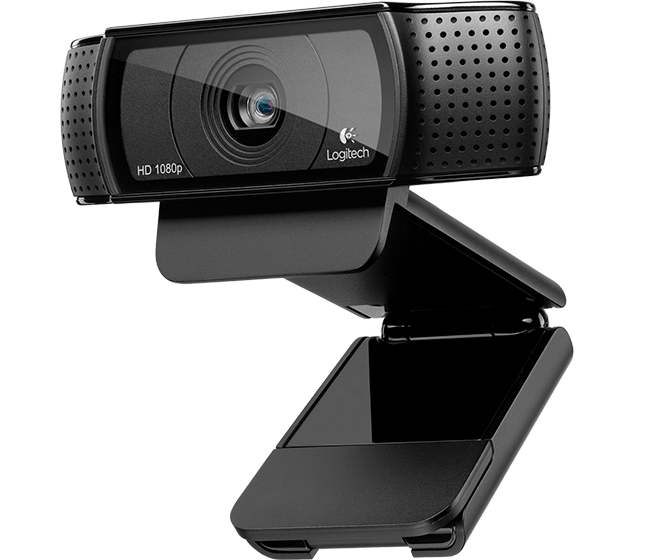
Enlarge / Logitech's popular C920 camera. (credit: Logitech)

The Windows 10 Anniversary Update, aka version 1607, has been found to leave many webcams inoperable. The update prevents the use of webcams in applications such as Skype and Open Broadcaster Software (OBS), along with all manner of custom CCTV programs. Extremely popular hardware, such as Logitech's C920 and C930e cameras, in conjunction even with Microsoft's own Skype, will fail to properly broadcast video.

People first noticed the issue earlier this month. But it's only within the last couple of days that the exact cause became clear via a post by Brad Sams on thurott.com.

Microsoft has said that a fix is in development, but has not yet said when that fix will be distributed.

Read 16 remaining paragraphs | Comments

PowerShell is Microsoft’s latest open source release, coming to Linux, OS X

Alpha packages available to download right now.

Microsoft today released its PowerShell scripting language and command-line shell as open source. The project joins .NET and the Chakra JavaScript engine as an MIT-licensed open source project hosted on GitHub.

Alpha version prebuilt packages of the open source version are available for CentOS, Ubuntu, and OS X, in addition, of course, to Windows. Additional platforms are promised in the future.

Announcing the release, Microsoft's Jeffrey Snover described the impetus for the move: customers liked the use of PowerShell for management, remote control, and configuration but didn't like that it was Windows-only. To address this concern, Microsoft first had to bring .NET, and then PowerShell itself, to Linux and other platforms. Snover says that PowerShell will be extended so that remote scripting can natively use ssh as its transport instead of Windows remoting.

Read 1 remaining paragraphs | Comments

Windows Holographic coming to Windows desktop next year

Any Windows PC with a VR headset will be able to run Microsoft’s 3D interface.

Microsoft's Windows Holographic promo video.

In June, Microsoft announced its plans to build a single platform suitable for virtual reality, augmented reality, and any other system that mixes computer-generated and real-world content.

At IDF in San Francisco today, Microsoft's Terry Myerson said that the Windows Holographic experience, including the shell used on the HoloLens hardware, will be made available as an update to the standard Windows 10 desktop operating system some time next year.

Currently, the HoloLens runs a specialized variant of Windows. Desktop Windows offers many of the same APIs as the HoloLens, but the 3D user interface that mixes existing 2D apps with new 3D ones is only available on the augmented reality headset. Next year's update will make it available to all, opening it up not just to Microsoft's standalone device but also to hardware such as the Oculus Rift and HTC Vive that provide tethered virtual reality.

Read 1 remaining paragraphs | Comments

Windows 7, 8.1 moving to Windows 10’s cumulative update model

Individual security fixes are out, combined packages are in.

(credit: Microsoft)

Microsoft is switching Windows 7 and Windows 8.1 to a cumulative update model similar to the one used by Windows 10. The company is moving away from the individual hotfix approach it has used thus far for those operating systems.

One of the major differences between Windows 7 and 8.1 on the one hand and Windows 10 on the other is what happens when you run Windows Update. Microsoft's two older operating systems usually need to fetch a handful of individual patches each month. If a system hasn't been patched for a few months, this can require dozens of individual fixes to be retrieved. In the case of a clean installation, that number can reach the hundreds.

Windows 10, on the other hand, has perhaps one or two updates released each month. A single cumulative update incorporates not just all of the newest security and reliability fixes, but all the older fixes from previous months, too. If a system isn't updated for a few months or has had its operating system freshly reinstalled, the scenario of having hundreds of individual fixes never occurs. Windows 10 just grabs the latest cumulative update and, with that one package, is more or less up-to-date.

Read 9 remaining paragraphs | Comments

Two major Windows 10 updates planned for next year

In October, there will also be a new LTSB version.

With the Windows 10 Anniversary Update, aka Windows 10 version 1607, released earlier this week, it's time to look forward to what's next.

Windows 10 has multiple release tracks to address the needs of its various customer types. The mainstream consumer release, the one that received the Anniversary Update on Tuesday, is dubbed the Current Branch (CB). The Current Branch for Business (CBB) trails the CB by several months, giving it greater time to bed in and receive another few rounds of bug fixing. Currently the CBB is using last year's November Update, version 1511. In about four months, Microsoft plans to bump CBB up to version 1607, putting both CB and CBB on the same major version.

The Long Term Servicing Branch, an Enterprise-only version that will receive security and critical issue support for 10 years, will also be updated. Currently, Windows 10 LTSB is essentially the Windows 10 RTM release with certain features such as the Edge browser and Windows Store permanently removed. On October 1, a new Windows 10 LTSB build will be released, starting another 10-year support window.

Read 3 remaining paragraphs | Comments
Firefox 48 ships, bringing Rust mainstream and multiprocess for some

Mozilla browser still trails the rest when it comes to sandboxing Web content.

A single Firefox process. (credit: Roger)

Firefox 48 shipped today with two long-awaited new features designed to improve the stability and security of the browser.

After seven years of development, version 48 is at last enabling a multiprocess feature comparable to what Internet Explorer and Google Chrome have offered as stable features since 2009. By running their rendering engines in a separate process from the browser shell, IE and Chrome are more stable (a Web page crash does not take down the entire browser) and more secure (those separate processes can run with limited user privileges). In order to bring the same multiprocess capability to Firefox, Mozilla started the Electrolysis project in 2009. But the organization has taken substantially longer than Microsoft, Google, and Apple to ship this feature.

Mozilla's delay was partly driven by changing priorities within the organization—Electrolysis development was suspended in 2011 before being resumed in 2013—and partly because Firefox's historic extension architecture made this kind of separation much harder to achieve. Traditional Firefox extensions can invasively meddle with parts of the browser and assume equal access both to the rendering engine and to the browser's shell. Firefox's developers had to both create a new extension system (they've ended up using HTML-and-JavaScript based extensions closely related to those pioneered by Chrome and also adopted by Edge) and create shim layers to offer developers a temporary way to continue to support their old extensions.

Read 3 remaining paragraphs | Comments
8TB disks seem to work pretty well, HGST still impressive

There’s no sign of a bathtub curve just yet.

(credit: Alpha six)

Cloud backup and storage provider Backblaze has published its latest batch of drive reliability data. The release covers failure information for the 70,000 disks that the company uses to store some 250PB of data.

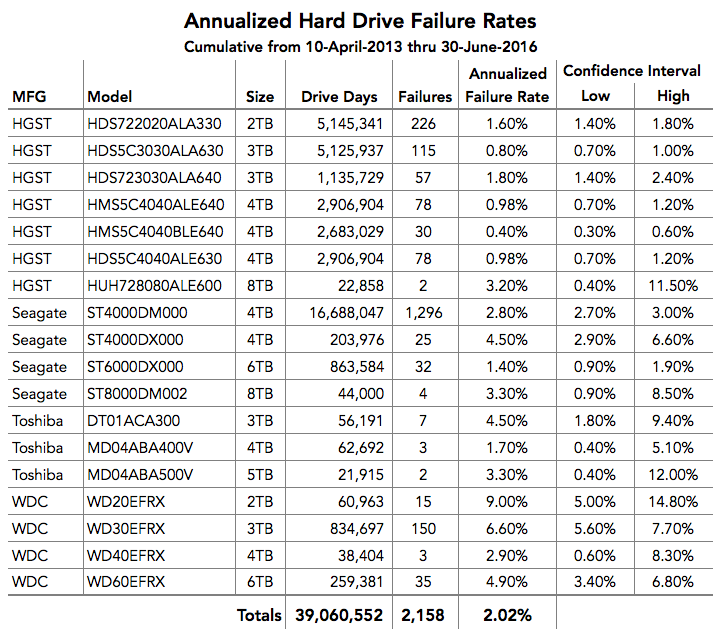
This is the first quarter that Backblaze has been using a reasonable number of new 8TB disks: 45 from HGST and 2720 from Seagate. Drives from both companies are showing comparable annualized failure rates: 3.2 percent for HGST, 3.3 percent for Seagate. While the smaller HGST drives show better reliability, with annualized failure rates below one percent for the company's 4TB drives, the figures are typical for Seagate, which Backblaze continues to prefer over other alternatives due to Seagate's combination of price and availability.

Annualized failure rates for all of Backblaze's drives.

Annualized failure rates for all of Backblaze's drives. (credit: Backblaze)

But it's still early days for the 8TB drives. While evidence for the phenomenon is inconclusive, hard drive reliability is widely assumed to experience a "bathtub curve" when plotting its failure rate against time: failure rates are high when the drives are new (due to "infant mortality" caused by drives that contain manufacturing defects) and when the drives reach their expected lifetime (due to the accumulated effects of wear and tear), with a period of several years of low failure rates in the middle. If the bathtub theory is correct, Backblaze's assortment of 8TB drives should suffer fewer failures in the future.

Read 1 remaining paragraphs | Comments

Windows 10 one year later: The Anniversary Update

Review: We take a closer look at Windows 10’s first major annual update.

Last year's Windows 10 release was unlike any Windows release I've ever used before, and I've used most of them.

Almost every Windows release to-date had a sort of unfinished vibe that reflects the product's history. Parts of the operating system developed long ago have almost fossilized, being preserved verbatim in each subsequent release. It gives the entire operating system an overall incomplete feel.

Take Control Panel as an example. The oldest parts of Control Panel use dialogs for each group of settings, as this mouse window exemplifies. Those tabs are extensible by third parties. That SetPoint Settings tab, for example, launches Logitech's mouse app for configuring the various buttons on my Performance MX mouse. New systems to this very day continue to use this extensibility; most Windows laptops will have a tab to configure their touchpad.

Read 92 remaining paragraphs | Comments

It’s now or never: Free Windows 10 upgrade ends in just a few hours

Act now before it’s too late.

It's better, we promise.

If you use Windows 7 or Windows 8.1 and want to upgrade to Windows 10 for free, there are just a few more hours left to grab your copy. The offer expires today, July 29. At the time of writing, less than 19 hours still remain.

If you're eligible, you should upgrade. In almost every regard, Windows 10 is a better operating system than Windows 7 or 8.1 (unless you use Media Center, in which case you're trapped on old operating systems forever). If you want to get the free upgrade but can't upgrade right now because of timing or compatibility concerns, your best option is to install Windows 10 onto an empty hard drive using your existing Windows 7 or 8.1 key. Activate that installation and magic will occur: your key will become Windows 10 "enabled," and you should be able to use it to perform the upgrade at a later date. Similar results can likely be achieved by installing into a virtual machine rather than an empty hard disk.

The cut-off doesn't apply to those who use assistive technology such as screen-readers; those Windows users will be able to upgrade to Windows 10 whenever they feel like it, though Microsoft apparently has yet to fully explain how this will work.

Read on Ars Technica | Comments