Review: Much-improved Iris GPU makes the Skylake NUC a major upgrade

Iris 540 gets 64MB of eDRAM, bringing big gains to low-power CPUs.

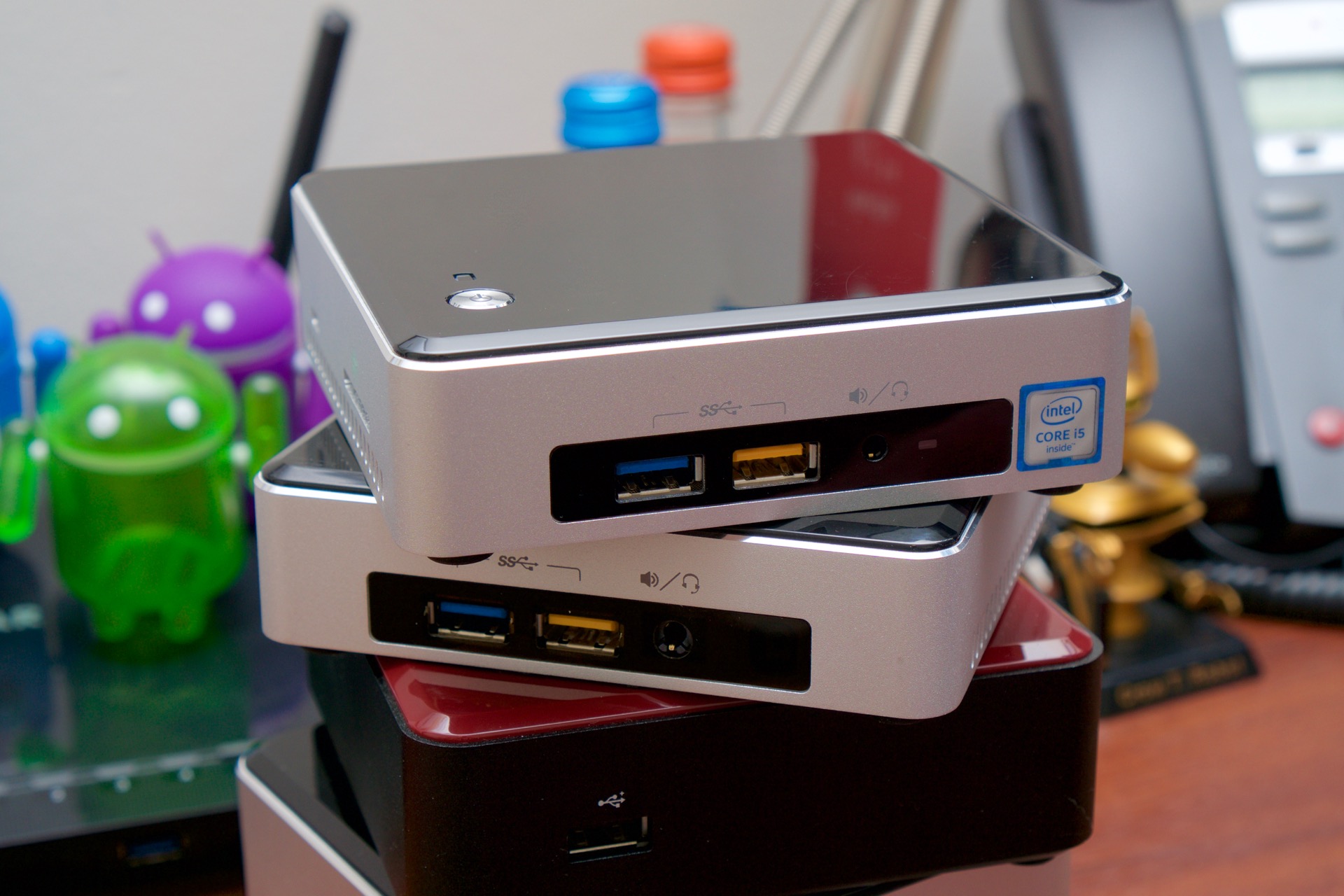
Intel’s “Next Unit of Computing” (NUC) mini desktops started off as interesting curiosities, experiments to see just how much computer could fit in a desktop PC that you could hold in your hand. Each subsequent generation has refined the overall concept and added other niceties, making it more and more like a solid consumer-ready computer (albeit one that makes you provide your own RAM and SSD and OS).

We looked at Intel’s fourth-generation NUC based on its still-relatively-new Skylake processors. On the outside, less has changed than ever before—Intel has settled on a “look” for the NUC and it’s not messing with the design much. On the inside, you get enough cool upgrades that you can almost forgive Intel’s CPU performance for improving so little in the last three or four years.

Model breakdown

Specs at a glance: Intel NUC NUC6i7SYK (as reviewed)
OS Windows 10 x64
CPU 1.8GHz Core i5-6260U (Turbo Boost up to 1.9GHz)
RAM 16GB 2133MHz DDR4 (supports up to 32GB)
GPU Intel Iris 540 (integrated with 64MB eDRAM)
HDD 256GB Samsung SM951 PCIe SSD
Networking 867Mbps 802.11ac Wi-Fi, Bluetooth 4.2, Gigabit Ethernet
Ports 4x USB 3.0, 1x mini DisplayPort 1.2, 1x HDMI 1.4b, headphones, SD card slot
Size 4.53” x 4.37” x 1.26” (115 x 111 x 32mm)
Other perks Kensington lock, swappable lids, IR receiver
Warranty 3 years
Price ~$400 (barebones), about $755 as configured

There are four Skylake NUCs as of this writing. Two include a Core i5-6260U with an Iris 540 integrated GPU, and two use a slower Core i3-6100U processor and a slower HD 520 GPU. Each processor comes in two cases: a taller one that makes room for a 2.5-inch hard drive or SSD, and a shorter one that doesn’t. Otherwise, all models share the same basic design, port layout, and other features.

Read 27 remaining paragraphs | Comments

Apple wants to “loop you in” at its March 21 press event

New iPhones and iPads expected, new Macs distinctly possible.

(credit: Apple)

Apple has just sent out invitations for a press event on March 21st, as expected. The invitation, pictured above, provides few hints about what is coming, but it does use the standard iPhone, iPad, Apple Watch, and MacBook finish colors (space grey, silver, gold, and rose gold). The event will take place at Apple's Cupertino campus and will get going at 10:00am PDT (5pm GMT).

The company is expected to make a handful of small announcements. One is a new 4-inch iPhone, which to date has been called the "iPhone 5SE" or simply "iPhone SE" in rumors. It's expected to include specs similar to the iPhone 6S (minus the pressure-sensitive 3D Touch screen) and to replace the iPhone 5S in the iPhone lineup. The second expected announcement is a new 9.7-inch iPad with updated internals and some features imported from the iPad Pro, including the Smart Connector and Apple Pencil support. The iPad Air 2 was introduced in October of 2014, and this is the longest Apple has gone without updating the standard iPad's hardware since the first model was introduced in 2010.

The event is also expected to usher in some more minor hardware and software updates, including some new Apple Watch band options, iOS 9.3, WatchOS 2.2, OS X 10.11.4, and tvOS 9.2. The timing is about right to introduce some new Skylake-based MacBooks and MacBook Pros, too, but we haven't heard anything specific about Mac refreshes. That doesn't mean it won't happen; it just means it's less likely to happen.

Read 1 remaining paragraphs | Comments

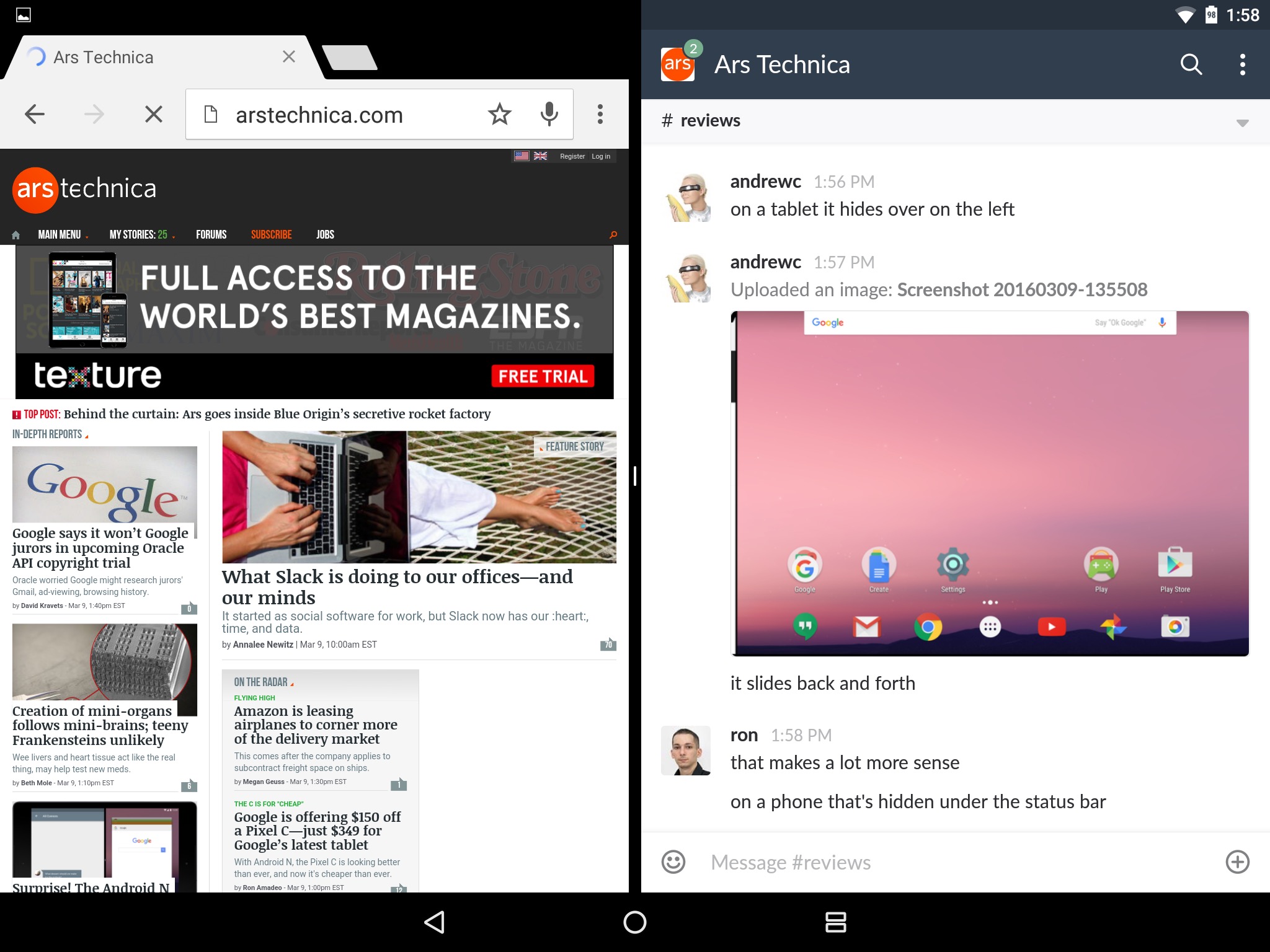
Android N’s multi-window multitasking mode is a very promising start

You’ll find a pretty satisfying version of the concept under all the early bugs.

Google has dropped an early version of the Android N preview months before Google I/O, which is when we first saw the Android M preview build last year. Developer images for most recent Nexus devices went up on Google's site today, and we've already got them running on some phones and tablets and we're digging in.

The most significant new feature, at least if you're still holding out hope for Android tablets, is a multi-window multitasking mode not unlike the ones in iOS 9, Samsung's version of Android, or Windows 8 and 10. It's come a long way since we saw the janky, hidden, mostly broken version of it included in early Marshmallow previews. It's about as buggy and crash-prone as you'd expect from an early build of an upcoming OS, but underneath those bugs is a multitasking UI that's actually pretty elegant, and it offers some nice improvements over the Split View mode introduced in iOS 9.

Understanding the basics

Android is iOS-like in that it seems to designate a "primary" and "secondary" app—we'll use these terms to specify which app we're talking about during this explainer. The primary app, chosen when you turn on multitasking mode, is on the left or the top half of the screen and is more-or-less pinned to that section of the screen. The secondary app, selected from the Recent Apps list or home screen once you've fired up multitasking mode, is on the right side of the screen and is easily switchable.

Read 11 remaining paragraphs | Comments

OWC launches first aftermarket SSDs for post-2013 Macs; they go up to 1TB

Drives are compatible with Apple’s proprietary interface, but they’ll cost you.

(credit: OWC)

There's very little you can do to upgrade most modern Mac laptops. Even when parts aren't soldered directly to the motherboard (as is the case for RAM in all Retina MacBook Pros and MacBook Airs), Apple has a penchant for proprietary connectors that can make it hard to find aftermarket parts.

Other World Computing has built its business around making and selling upgrades compatible with Macs, and now it's finally selling aftermarket SSD upgrades that are compatible with MacBook Airs and Pros manufactured in or after 2013. That was the year Apple began shipping speedy PCI Express SSDs in its Macs, but they all used proprietary connectors instead of standard (but then either nonexistent or uncommon) interfaces like M.2. OWC's Aura drives come in 480GB and 1TB capacities, and they'll work in all modern MacBook Airs and Retina MacBook Pros (you can check the site for specific model compatibility).

OWC says the drives come with a three-year warranty and will begin shipping in late March. It also says that "you’ll never need to compromise your data by relying on complicated software hacks or TRIM enablers to get the most from your upgrade," which either means that the drives natively support OS X's TRIM feature somehow (not normally the case for aftermarket SSDs) or that the drive controllers' normal garbage collection capabilities work fine without TRIM.

Read 1 remaining paragraphs | Comments

Six months in, Google’s apps still don’t fully support iOS 9

Docs, YouTube, and others are continuously updated but aren’t good iPad citizens.

iPad Pro support, yes. Full-fledged iOS 9 support, not so much. (credit: Andrew Cunningham)

Google updated its Docs and Sheets productivity apps on Tuesday to support the iPad Pro's larger screen resolution. As you might recall from our iPad Pro review, iOS apps that don't properly support Apple's guidelines for resolution-independent apps will look stretched out and slightly blurry on an iPad Pro, much like an iPhone 5 app would look larger and blurry on an iPhone 6.

The problem, as pointed out by MacStories and elsewhere, is that the apps still don't support the Split View multitasking features Apple introduced in iOS 9 when it was announced in June and released in September. This is especially noticeable because productivity apps are the best fit for Split View multitasking—it just makes it easier to grab text and other data from one place and paste it down in another place when your apps are side-by-side. And it's not just Docs and Sheets that still haven't gone all-in on iOS 9. Few of Google's apps support Split View, and the YouTube app doesn't support the Picture-in-Picture multitasking mode either.

Google Chrome picked up iPad multitasking support back in October, so it's not as though Google doesn't recognize the benefits of the feature (the company is also taking advantage of new iOS 9 features to make the browser faster and more stable). It's just that Drive, YouTube, Docs, Sheets, Gmail, Inbox, and others, despite being actively maintained and updated with some frequency, still aren't supporting features that Microsoft and other big companies have already gotten behind. And as nice as it is to be able to use first-party Google apps with Google's services on the iPad, this sort of thing is frustrating for people who want to use their iPad or iPad Pro as their primary computing device.

Read on Ars Technica | Comments

Razer Blade Stealth review: What happens when gamers make a regular laptop?

Without a GPU, it’s just a competent Ultrabook with mediocre battery life.

Razer launched its very first laptop, the astronomically expensive 17-inch Razer Blade, almost five years ago. Since then, the company's lineup has grown. It launched a smaller version of the Blade a couple years later, followed by a tablet experiment and some desktops designed and sold in partnership with Lenovo.

Up until now, all of those PCs focused on gaming. You could use them all for general productivity tasks, but if you didn’t plan to play games there were other, better, cheaper options readily available. The Razer Blade Stealth, on the other hand, is positioned to compete directly with regular Ultrabooks from Dell, HP, and other more pedestrian PC makers. Razer still had gaming in mind when it designed the Blade Stealth—a separate Thunderbolt dock can house a dedicated desktop GPU that you connect to the laptop with a Thunderbolt cable—but that accessory is optional and isn’t due out for another month or two.

In fact, the company asked that we evaluate the Blade Stealth primarily as an Ultrabook and not as a gaming laptop, partly because it’s targeting a wider market and partly because its integrated GPU won’t stand up to laptops with dedicated graphics chips. As a laptop for a more general audience, the Blade Stealth has its good points, but the comparison to heavy hitters like Dell’s XPS 13 isn’t always flattering.

Read 24 remaining paragraphs | Comments

Amazon will restore Fire OS‘ encryption support in the spring

Fire OS 5 dropped the feature, but a new update will bring it back.

Amazon will restore optional full disk encryption to Fire OS 5 in a software update "coming this spring," according to a statement released by the company on Friday evening.

The company originally removed disk encryption support in FireOS 5, which was introduced on Fire tablets last fall. It only made headlines yesterday after that update started to roll out for older devices—those tablets shipped with encryption support which was removed by the update, and users complained. The topic of device encryption is also on everyone's mind thanks to Apple's high-profile fight with the FBI over a locked iPhone 5C.

Amazon originally said that it removed encryption support from the Android-based Fire OS because it was an "enterprise feature" that "consumers weren't using." The complaints and news reports were apparently enough to get the company to reverse course.

Read on Ars Technica | Comments

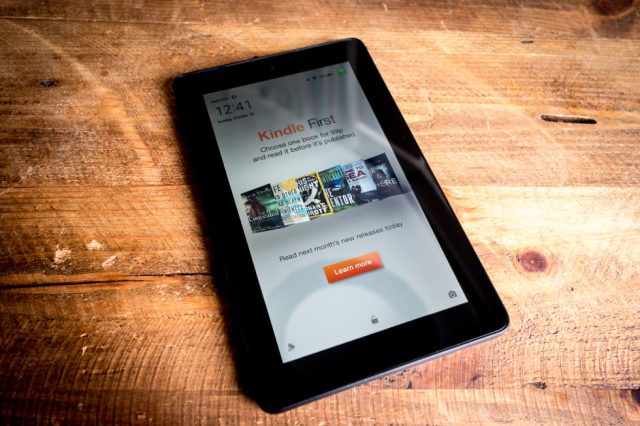
Amazon removed device encryption from Fire OS 5 because no one was using it

New Fire tablets and old ones that were upgraded to Fire OS 5 can’t be encrypted.

Amazon's $50 Fire tablet, which runs Fire OS 5. (credit: Mark Walton)

In the wake of Apple's high-profile fight with the FBI, more users and journalists have been paying attention to encryption of local storage in phones and tablets. Apple began encrypting all devices by default in iOS 8. Google made encryption a requirement for all Google-approved Android phones that ship with Marshmallow (after a false start in Lollipop), and it has been available as an optional Android security feature for years.

Amazon's Fire OS is a fork of Android, based on the Android Open Source Project (AOSP) code but without Google's apps and services or guaranteed compatibility with apps developed for Google-approved Android. Amazon has heavily customized the UI and provides its own app store, but it typically leans on AOSP code for under-the-hood, foundational features—in older Fire OS versions, the optional device encryption was handled the same way it was on any Android device. However, according to user David Scovetta and others on Amazon's support forums, that encryption support has been deprecated and removed in recent releases of Fire OS 5, both for new Fire tablets and for older devices that have been upgraded.

We contacted Amazon for comment, and the company told us that local device encryption support was removed in FireOS 5 because the feature wasn't being used:

Read 3 remaining paragraphs | Comments

PSA: Updated Apple certificate means old OS X installers don’t work anymore

If you’ve made a USB disk or downloaded a previous installer, please re-download.

(credit: Andrew Cunningham)

On February 14, something called the Apple Worldwide Developer Relations Intermediate Certificate expired. This sort of thing is typically routine; it was renewed and developers were advised to update their certificates so their Apple Wallet Passes, Mac apps, extensions, Safari push notifications, and App Store submissions would continue working properly.

There's one edge case for people who frequently troubleshoot and fix Macs, as pointed out by TidBits: old OS X installers downloaded from the Mac App Store before the certificate's expiration date will no longer work. This includes not just installers for El Capitan, but also downloaded installers for Yosemite, Mavericks, Mountain Lion, and Lion—every OS X installer issued using the Mac App Store. It also affects any USB install disks you've created using the downloaded installer.

You can easily re-download any installers you want using the Mac App Store, though for older OS X versions you'll need to make sure that the installer is listed in your purchase history. Also, note that you can't download a version of OS X that isn't compatible with the Mac you're downloading it on; my 2012 iMac can download everything back to Mountain Lion, but it refuses to download Lion. Keep this in mind if you have an extensive back catalog of old installers for archival reasons—as a workaround, setting your Mac's date to before February 14 should also allow older installers to work properly.

Read on Ars Technica | Comments

New DisplayPort 1.4 standard can drive 8K monitors over a USB Type-C cable

“Visually lossless” compression helps push higher-res displays with better color.

(credit: VESA)

Today, most new computers with DisplayPort or USB Type-C connectors support the DisplayPort 1.2 standard, which provides enough bandwidth to drive a 4K display at 60Hz over a single cable. In late 2014, VESA published the DisplayPort 1.3 standard, which increased the available bandwidth enough to drive 60Hz 5K displays or 30Hz 8K displays over a single cable. And today, VESA has finalized and released the DisplayPort 1.4 spec, which can drive 60Hz 8K displays and supports HDR color modes at 5K and 8K.

The physical interface used to carry DisplayPort data—High Bit Rate 3 (HBR3), which provides 8.1Gbps of bandwidth per lane—is still the same as it was in DisplayPort 1.3. The new standard drives higher-resolution displays with better color support using Display Stream Compression (DSC), a "visually lossless" form of compression that VESA says "enables up to [a] 3:1 compression ratio." This data compression, among other things, allows DisplayPort 1.4 to drive 60Hz 8K displays and 120Hz 4K displays with HDR "deep color" over both DisplayPort and USB Type-C cables. USB Type-C cables can provide a USB 3.0 data connection, too.

The standard includes a few other features, most of which are targeted at home theater buffs:

Read 1 remaining paragraphs | Comments